The Wrath of Kon

Dispatches, thoughts, and miscellanea from writer Jon Konrath

April 2011

List: 30 Ways to Reach First Base

IMG_1899

  1. Hit a single.
  2. Reach on an error.
  3. Walk on four balls.
  4. Get hit by a pitch.
  5. Catcher drops the ball after the third strike.
  6. Fan interference.
  7. Catcher interference.
  8. A pitching infraction that results in a 4th ball.
  9. A pitched ball lodges in the catcher or umpire’s mask on the third strike or fourth ball.
  10. Replacing another player that just reached first base.
  11. Purchase failing MLB franchise, build new stadium, create a ground rule stating that a player with your exact name is awarded first base at each at bat regardless of the strike/ball count, add yourself to the 25-man roster.
  12. Star in a stupid movie based on a British book written about a different sport, run on field to chase romantic interest Jimmy Fallon.
  13. Take a 25% dose of the steroids normally used to hit home runs.
  14. Take 4 train from East Side or B/D train from West Side, stop at 161st St, enter at gate 6.
  15. Hire Uri Geller, learn secrets of hypnosis, hypnotize all defensive players and umpires.
  16. Jet pack.
  17. Time at-bat with zombie apocalypse, wait until all players are infected, have co-conspiritor drop large pile of human brains on the warning track by center field.
  18. Build time machine, send cyborg back in time to kill pitcher’s parents; repeat until you get a really bad pitcher you can easily hit.
  19. If you play first base, you will always reach first base nine times, provided you don’t leave the game early.  (Why isn’t this ever on any of these lists?)
  20. Have fans throw batteries at the head of the pitcher.  (Works best if you play for the Phillies and are at a home game.)
  21. Scout a pitcher born with phenylketonuria; feed him large amounts of aspartame prior to his start.
  22. After strikeout by a pitcher born outside of the United States, petition the United Nations Commission on International Trade Law for arbitration, arguing the pitcher’s work status is in dispute due to paragraph 9 of General Assembly resolution 2205 (XXI) of 17 December 1966.
  23. Up-down-up-down-left-right-left-right-A-B-Start.
  24. Either build a second moon, or move an asteroid into Earth orbit, with enough mass to change tidal patterns and conversely change barometric pressure to alter the pitcher’s ability to locate the ball correctly.
  25. Do not give the pitcher LSD (especially if it is Doc Ellis.)
  26. Start a facebook petition to put you on first base.
  27. Travel to bizarro alternate reality where you get to advance to first base after you swing at nothing three times.
  28. Send a photo of a gun to the pitcher’s cell phone. (This probably works best if you are Elijah Dukes.)
  29. Be the daughter of Bud Selig when he is on first base and suddenly needs it to look like he doesn’t own first base because he took a new job.
  30. Practice.

On writing tools

In my last post, I talked about my old standby writing tool, emacs, and how I’ve made a gradual break from it.  So here’s what I’ve been doing.

First, there was a recent stream of different full-screen writing tools dumped on the market.  It’s the latest fad: some program that closes off everything but a single window to write.  To me, that seemed largely stupid; you just expand your editor window full-screen and shut off your IM program, right?  Well, there’s more to it than that.

First, I have horrible ADD or ADHD or something.  Not diagnosed, no pills or doctors, but I - what was I talking about?  Seriously, I have a hell of a time focusing on writing these days, especially with all of the distractions out there in the internet world.  And writing involves a certain amount of self-hypnosis, that ability to suspend disbelief and not even think about writing, but still type it on the page and channel your subconscious and capture it into your work.  And it’s damn hard to do that when you can click on the other window to check your twitter feed and derail the whole thing.

For a while, I would either turn off my wifi, or I would use this program called Freedom, which completely locks your internet connection unless you reboot.  (And those of us who don’t use Windows aren’t in the habit of rebooting hourly, so this is a Big Deal.)  I know, I should just be able to shut off wifi, or just not click on that god damned browser window.  But I can’t.  It’s nice to be able to completely childproof the process.

I also experimented with trying to fake a full-screen writing program with emacs, adding some margins and pumping up the font size, so I could go full-screen and only have a nice blank page to stare at.  But one day, in a fit of writer’s block fury, I went to the app store and picked up a copy of OmmWriter.

Screen-shot-2011-04-17-at-10.49.49-AM

OmmWriter is pretty damn amazing. Basically, you start it, and it opens a text editor over your entire screen, plain and simple.  But the little details are what make it so slick.  First, it shuts off all notifications.  If you’re using Growl to sling popups when you get new mails and whatnot, those all get halted.  Next, it draws this background picture of a winter landscape that looks like some lost Tori Amos album back cover.  And as you start typing, the borders and minimalist menu buttons fade away.  The fonts are very readable and high-design typography too; no more Courier New or whatever the hell emacs uses by default.  There’s also a word count tally at the bottom of the resizable text area that will vanish as you get to work.  And there’s a choice of several mellow, new-agey ambient soundtracks that play in the background.  And all of this sounds hokey, like I’m about to talk to you about an opportunity to resell some healing crystals to your family and friends, but it seriously works.  I don’t know why, but it made it much easier to fade into the work.  It was awesome for journal entries and articles and brief bursts of automatic writing.  But it was not a full-fledged content management system; there’s no way I could write a book in this thing.

Side note: this thing uses OSX’s text editing widget or engine or whatever you call it.  And something I did not realize: most of emacs’s key shortcuts work in any program that uses this.  So if you reflexively use Ctrl-A and Ctrl-E to jump to the start and end of a line, that totally works, either in the Mac’s TextEdit, or a program like Ommwriter.

So I’ll cut to the chase: after a few other trials, I finally got into using Scrivener.  And it has completely changed the way I write, because it finally does what I need to keep organized.

One of the biggest things is I need a system that can deal with me writing in “chunks”.  There are other virtual index card systems, but they typically don’t let you meld the cards into one huge work.  And outline programs are great (I’m a long-time user of OmniOutliner) but I always hated trying to reconcile changes in the actual writing with changes in the outline and vice-versa.  I wanted a way to have the outline be the document.

Screen-shot-2011-04-17-at-11.14.24-AM

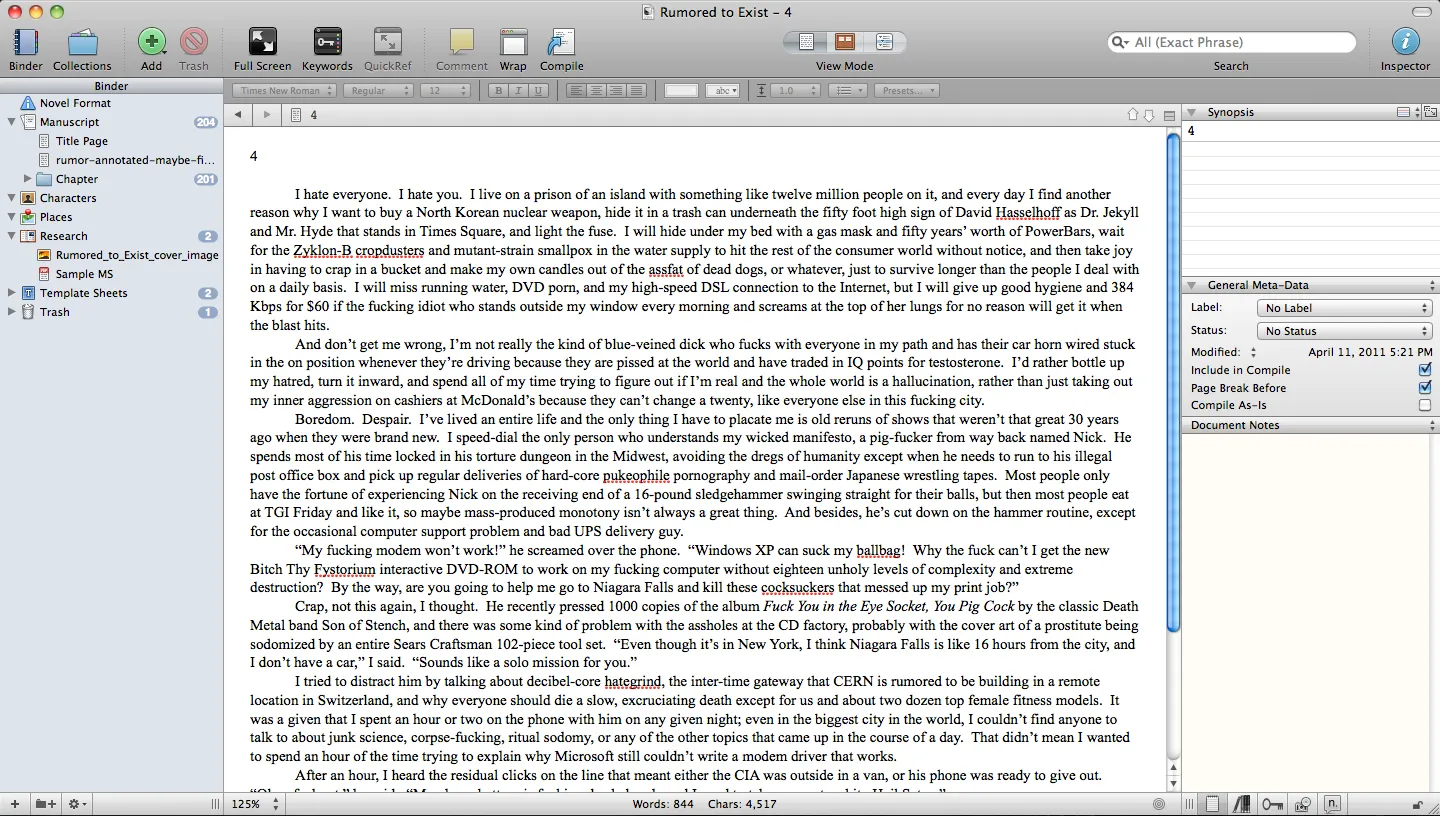
Scrivener is a lot like modern IDEs you’d use to write code: there’s a binder that’s a project-level collection of folders, with one folder being the actual manuscript, and the other folders being whatever the hell you want.  In a folder, you can create other folders, or you can create documents.  So let’s say my manuscript has a dozen chapters, I can make each of those a folder.  Then in each folder, I can have a bunch of text documents, one for each scene or paragraph or whatever the hell I want.  I can drag those around in any order, chop them into smaller pieces, merge them, add more, delete them, whatever.  Then when I click on my chapter folder in the left navigation pane, I’m presented with every piece in that folder, all glued together into one document.  Click at the root level, in the manuscript folder, and you’ve got your entire book.  It makes it very easy to write in fragments, and move things around easily.  This is pure magic for me.  I really wish I had a program like this when I wrote Rumored to Exist - it would have saved me at least a year of time.

Here’s the real beauty.  You like to work with index cards?  Each of these fragments has an associated title and page of metadata that you can see in the right pane inspector.  You can type in a little blurb of what happens in your fragment, or what needs to happen, or what you want to fix.  Then you click a button in the toolbar, and instead of seeing the text editor, you see a corkboard with a bunch of index cards, each one being that metadata for each text document.  If you don’t like the order, drag them around and make it work.  When you go back to the text editor, all of your pieces will be reordered.  You want an outline?  Click another button in the toolbar, and you see all of your documents and folders and stuff in an expanding/collapsing outline.

I take a lot of notes when I’m writing, and have all sorts of loose text documents and other crap associated with a project: loose wikipedia articles, jpeg images, maps, whatever.  Instead of throwing all of that in a directory on my hard drive, I can keep it all in a folder that resides outside of my manuscript.  And you can totally hyperlink this crap, too.  So you can have a page per character, with facts and stats about the person, a character sketch or notes or whatever else, and you can drop links in there to scenes where they appear.

There’s a full screen mode, too.  It’s not as pretty as the OmmWriter one, and it does not have any Brian Emo ripoff music playing, but it works.  It’s pretty easy to jump back and forth between the full screen and the three-pane mode, which is good for me; I can focus on inputting long passages of text, then jump back into org mode and move things around.  I’ve still got those emacs shortcuts too, because it uses that Mac text engine.

One of the big issues I had too was import and export.  I really can’t have my stuff locked into a proprietary format where I can’t get it to a publisher or to someone for review.  Scrivener has very good import and export functions; you can work in this weird nonlinear format, and when you’re ready to lock it down, you press a compile button and jet out a copy in RTF for your Microsoft Word-impaired buddies.  Need it in plain text, or Final Draft, or HTML, or PDF?  No problemo.  It gives you a fully submittable, standard format document that’s ready to go to the world.  And here’s something awesome: you can press a button, and it will spit out a perfectly formatted .mobi file, ready to submit to the Kindle store.  (It does .epub too, if you’re not down with Amazon.)  All of the exports are very configurable, too.  So if you need different headers or footers or page breaks or fonts or whatever, you can screw around with that stuff to your heart’s content.  You can also do weird stuff like import or export parts of your document automatically.  So you can do stuff like use a standard text editor to take notes on another computer or your phone, then dump that stuff into Dropbox or a shared directory, and Scrivener will pull those files into your binder, or vice-versa.

Screen-shot-2011-04-16-at-11.02.28-PM

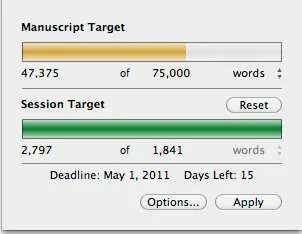
Another big thing for me is statistics.  I need to know at any given second how many words are in a project.  Whatever you have open in the text editing pane (chapter, fragment, manuscript, whatever) has a word count in the bottom bar.  But you can also do a quick Ctrl-Shift-T and get a word count for the project.  You can also set a goal date and count, and it will calculate how many words you have to write that day, and pop up a nice little reminder in Growl when you hit your target.

There are tons of other features I will never figure out.  It has comments, and little flags you can set to indicate if something is a draft or a revision, and snapshots, and citations, and tons of search and replace things I have not figured out.  But the ability to write in a completely nonlinear fashion is a big thing for me, and this works way better than any other system out there.

Anyway, if you’re in a similar predicament, check out their site and download the free trial.  The learning curve is steep, and I initially had a big freakout trying to figure out how to carve my next book project into the right type of pieces.  But I’ve got the next book underway and it’s motoring along fine.  And I’ve imported both Summer Rain and Rumored, and I’m vaguely thinking about dumping those to the kindle.

Enough babbling about tools.  Time to get back to work.

The Death of Emacs

P8310015

I’ve been too busy to do anything over here, too busy and slightly sick for a few days.  I’m trying to get caught up on 19 things today, and of course it’s a beautiful, sunny day out, and I think I’ve left the house once all week, so that’s beckoning me.  But I thought I’d take a second to brain dump on a few things before then, as I listen to some Black Sabbath (Master of Reality) and sit on the couch with my recently-returned MacBook Pro.

Ever since I started writing in 1993, I pretty much used emacs for everything.  Emacs is a text editor that originally gained fame on unix systems, although that’s misleading, because it’s a million things in addition to just a text editor, and it runs on pretty much every system you could thing of, aside from just unix.  It is infinitely extensible, using its own dialect of the lisp language, and I used a bunch of extensions in it to read my mail, read usenet news, write code, write books, write the earlier version of this site, keep a dream journal, and catalog all of my CDs.  I wrote all of my books in emacs, using it as a text editor and keeping track of various outlines and fragments and notes in a bunch of text files.  Right before publication, I’d usually move the files over to Word or FrameMaker, but the bulk of the work was in emacs.  I’d also use unix tools like wc and grep and find and sed to do all of my various slicing and dicing and counting and finding.  It wasn’t the best system in the world, but it worked.

I even made some money on emacs, tech editing a book for Sams on emacs.  So my brick-and-mortar book store debut on the printed page was actually back in 1999, although I wasn’t a primary author, and reading about how to write elisp config files is probably less entertaining than any of my more recent work.

But as cool as emacs was, it also sucked.  Every time some idiot in Norway suddenly had a great idea on how they thought tabs should work in a document, they would change the whole thing and I’d spend 22 hours straight poring over source code diffs trying to figure out how the hell to write a shim or workaround to duct tape to the side of the thing so it would work again.  Long lines and line breaks were also a huge pain in the ass, which takes some explaining, so hang on.

When you write a paragraph in Word or any other modern word processor, you generally don’t type return at the end of a line; you just type and type and when you hit the edge of the window, the word gets pulled to the beginning of the next line, and you keep going.  The only special character is a paragraph break, which comes when you hit return once or twice at the end of a block of the text.  In emacs, what happens is that when you reach about the 72-character mark in a buffer, it drops in a carriage return and goes to the next line.

That means when you type a file in emacs and bring it into Word (or WordPress, or FrameMaker, or an email message, or anything else not designed in like 1974) you have all of these extra carriage returns, and you have to do something stupid like write a script or do some search-and-replace to replace all of the single carriage returns with spaces and all of the double carriage returns with paragraph breaks, and hope you didn’t do any weird indented text or source code snippets that will be monumentally fucked by your search and replace.

And yes, there are some workarounds in emacs, like some long-line mode, which is totally not documented, or at least not documented well, and would involve me taking two weeks off of work to completely re-engineer the whole fucking universe and probably reinstall emacs 19 times and recompile it from source and install 2834 different libraries and twelve different versions of XCode.  And the second I would get it working, some college freshman in Sweden or Germany would add a fix that would completely break my system.

I should also mention that emacs has slowly been losing favor here, as far as alternative uses.  I got the Mac in 2005, and at some point switched to using Mail.app full-time.  That also meant ditching BBDB, the emacs address book thing, and going to the Mac address book.  CDs are a distant memory, thanks to iTunes.  I gave up on my own blog system and moved to WordPress.  Usenet is deader than dead.  So it pretty much just came down to daily writing for emacs.

Another big issue for me is keeping track of stuff, especially in bigger writing projects.  I’ve used two different approaches to books.  When I wrote Summer Rain, each chapter was in a text file, and there was a sea of text files for notes and pieces and outlines and whatever else.  This book took a huge amount of research and planning over the course of five years, and by the end of the book, I worked off of a paper outline that summarized the main points in each chapter.  I made heavy use of grep to search for things within each chapter.  When I needed to do a global search and replace, I would use emacs and dired, which worked, sort of.  Dired-mode is powerful, but good luck remembering all of the key combinations if you don’t use it on a daily basis.  Printing out the book for review was murder, not only because of the length, but because it typically involved catting all of the files together, dropping it in Word, and doing the carriage return/paragraph break shuffle.

When I wrote Rumored to Exist, I put the entire thing in one file.  That made it easier, but it also meant a hell of a lot of scrolling around.  It also made it absolutely impossible to do stuff like move around chunks and keep track of what was where unless I printed out every damn page and spread them across every surface of my apartment like I was on some William S. Burroughs kick and about to shoot my wife in the head and write some Serious Nonlinear Fiction.  (My apartment did have a lot of bugs, which was a plus.)  Around the time I moved to New York, I decided I needed to start over, and put the entire book in a file called rumored-seattle.txt, then opened a blank file and started copying over only the good chunks.

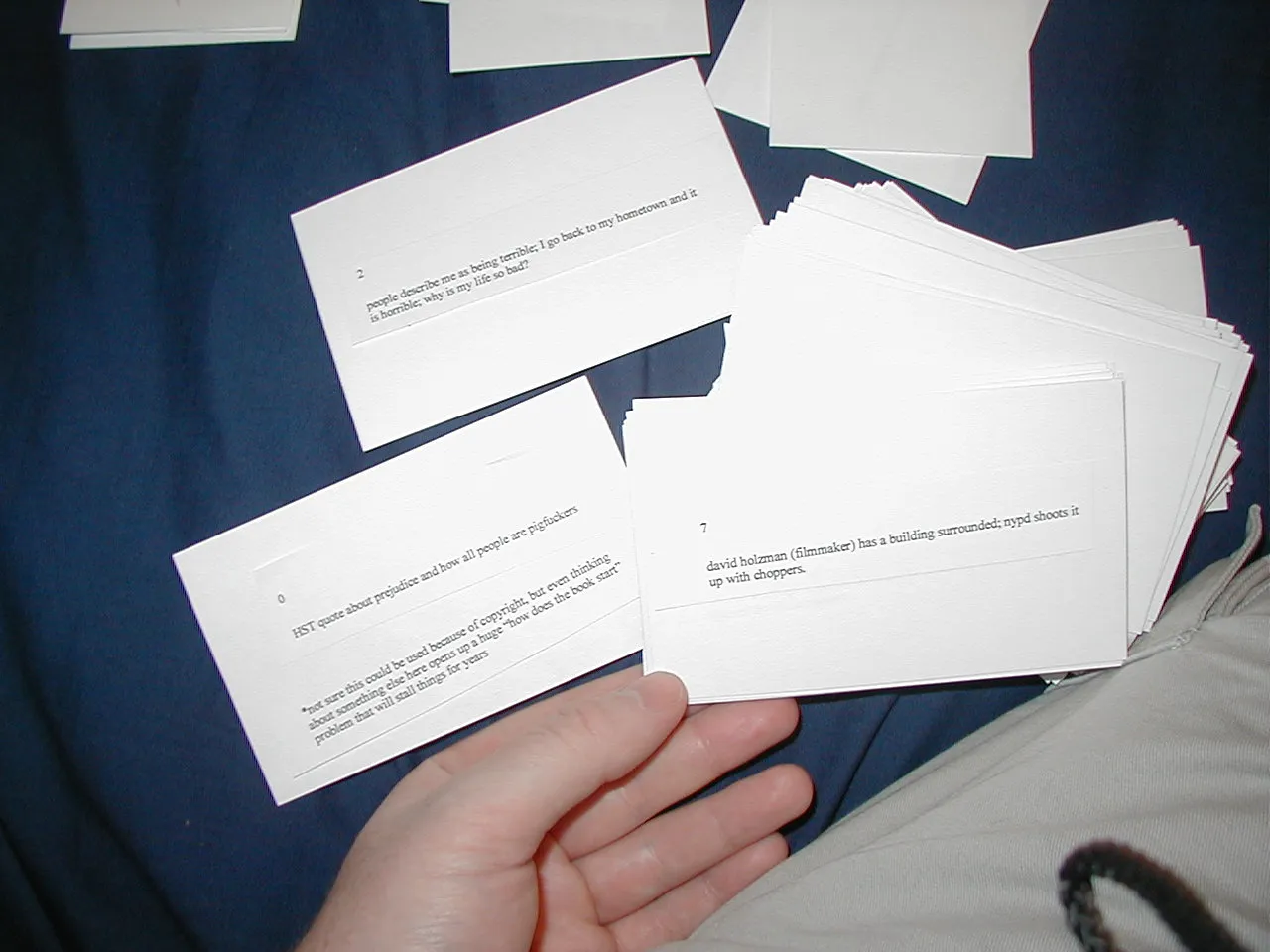
Thinking back on it, writing Rumored was such a fucking disaster.  I had all of the content done in a couple of years, but then it took a couple more years of rewriting and moving things around and adjusting things.  I printed out every page, then cut everything up and glued it to index cards that I tried to rearrange and sort and move around.  I tried writing outlines; I tried putting everything in excel one time, with thoughts of color-coding or sorting it.  I thought about writing a PHP/MySQL app to manage everything.  I tried using the emacs outline-mode.  Nothing fucking worked.

I eventually kicked my way through it, and got everything in one file, then sat in the Kiev restaurant with a red pen and a bunch of pierogies and went through the whole god damned thing and marked up every mistake and typo, and had a total and complete draft that if I got in those corrections, would be ready for the press.  Then I walked home and got caught in a god damned typhoon, and when I got home, I had a ruined pair of dress shoes, and a clipboard of pulp and pink pages, everything completely ruined.  I was pissed as fuck. That was on September 10th, 2001, and let’s just say things got put into perspective the next morning.

So I’ve been looking for new system.  Someone has figured this out, right?

I have tried a bunch of systems and software packages, and I think I have one that works.  I also realize that I’ve written for 1300 words, and haven’t even gotten into it yet.  So I should probably make this a two-parter and tell you about the software itself next time.  And I should probably wrap this up so I can actually go write with the damn thing and work on this book.

List: 14 Product Variations That Never Got Past Focus Group Testing

  1. Cap’n Crunch Atlantic Cod Crunch Berries
  2. Olde English 800 Sport malt liquor with electrolytes
  3. Lego Postal Rampage playset
  4. The McDonald’s McHaggis, turnips, and fries value meal
  5. Old Spice Pure Sport scented enema
  6. The Capital One Planned Parenthood Abortion Rewards Visa card
  7. Clorox Cool Ranch Toilet Cleaner
  8. Prune Pepsi Max
  9. Taco Bell CrunchWrap de Tripita
  10. Smith and Wesson My First .357 Junior Revolver
  11. Little Debbie Purim Kreplach cakes with liver
  12. Sherwin Williams Your Mother’s a Whore house paint
  13. Hawaiian Punch Guava Bacon Crush
  14. Jello Pudding Contraceptives