The Wrath of Kon

Dispatches, thoughts, and miscellanea from writer Jon Konrath

2015

Flickr Magic View

Screen-Shot-2015-06-01-at-7.41.28-AM

The other day when I posted about Google Photos, I mentioned how I hoped some of its features for image discovery and auto-categorization would come to other tools like Flickr. Well, I should probably log onto my Flickr account more often, because it looks like they did.

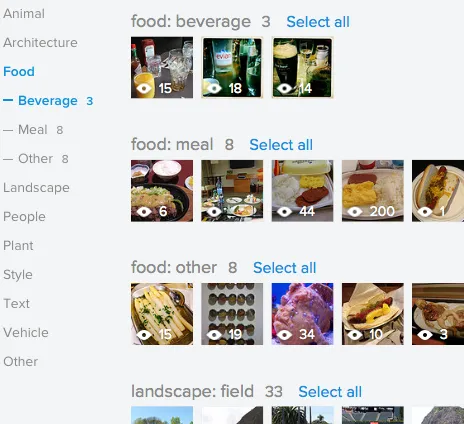
Flickr now has a feature called Magic View. If you go to your Camera Roll view, there is a slider at the top that defaults to Date Taken, but you can toggle it to Magic View mode, which groups together photos into various object categories.

My Google Photos uploader worked away all weekend, eventually transferring about 27,000 unedited photos to their cloud. The Assistant wizard is still churning away, sending me various alerts as it groups together things into animations or “stories.” I only have about 10,000 photos on Flickr, because I use it as a repository of public albums of sorted and edited photos, and not a complete bucket of everything I take. But there’s enough there to compare the two.

In general, Flickr is way better at auto-categorizing things. For example, I take a lot of pictures of my cats. If they are at all blurry, or the cats are wearing a costume (don’t judge), they are categorized by Google as dogs. My long-haired cat got identified as a raccoon a bunch of times. I have a category called “Race Tracks” on Google, which consists of pictures of stalled traffic on the Bay Bridge, and baseball diamonds. I also have a category named “Football” that is pictures of swimming pools and people in the desert. Flickr isn’t perfect; it thinks snowmobiles are bikes, and thinks a lot of old Las Vegas is an amusement park.  (Maybe it is, from a metaphorical standpoint.) But Flickr seems to be a bit better for me.

Flickr has some interesting categorizations. One I like is a “style” category, that identifies things like pictures with strong depth-of-field or abstract composition. Google has some other interesting concrete categorizations, like taking a stab at identifying when something is a wedding, art museum, or concert.  (Although for me it also grouped proms, hotel lobbies, and night portraits in those respective buckets.)

Google does group by people, place, and thing, and the first two of those are mostly absent from Flickr. Flickr does no facial recognition, but the Photos software by Google only groups your like-faced photos with no identifying tags, just within your photos, so it’s not as accurate, and gives you no way to label a collection as being a person, like you could in iPhoto, Picasa/G+, or Facebook.  Flickr can store geo data and group your photos on a map, but that’s a different interface, and it’s slightly clunky. It would be nice to see a list of cities/countries with all of my photos in that location. I guess it’s possible to write an app to do that, or maybe somebody has.

Flickr also doesn’t do any of the Assistant things that Google does, like auto-stitching photos into panoramas, or making “Stories,” which are slideshows from auto-curated chunks of photos spanning multiple albums.  These can be pretty goofy, though, especially because there’s no metadata or context to things you’ve mass-dumped into Google Photos. Like I have these stories titled “Ten Days in Oakland” that are assembled-together slideshows of crap I saw at the grocery store.

This further brings up the issue of using a cloud service like this as a private cache of everything I’ve taken, versus a public set of edited photos. I use my phone as an extension of my memory, and I’m always snapping pictures of notes or grocery lists or things I need to remember. I also try to document things only I’m interested in, because I know that now I wish I would have taken more photos of things in the past so I could go through them now when writing or sinking into a pit of nostalgia. I don’t want those to be public, but it might sometimes be interesting to have them grouped. I might continue mirroring photos on Google, but keeping everything public on Flickr.

Oh, in case you’re curious, I’m on flickr at https://www.flickr.com/people/jkonrath/

[2020 update: of course they removed this feature a year or two ago.]
Yes, I can legally perform your satanic gay wedding

IMG_0171

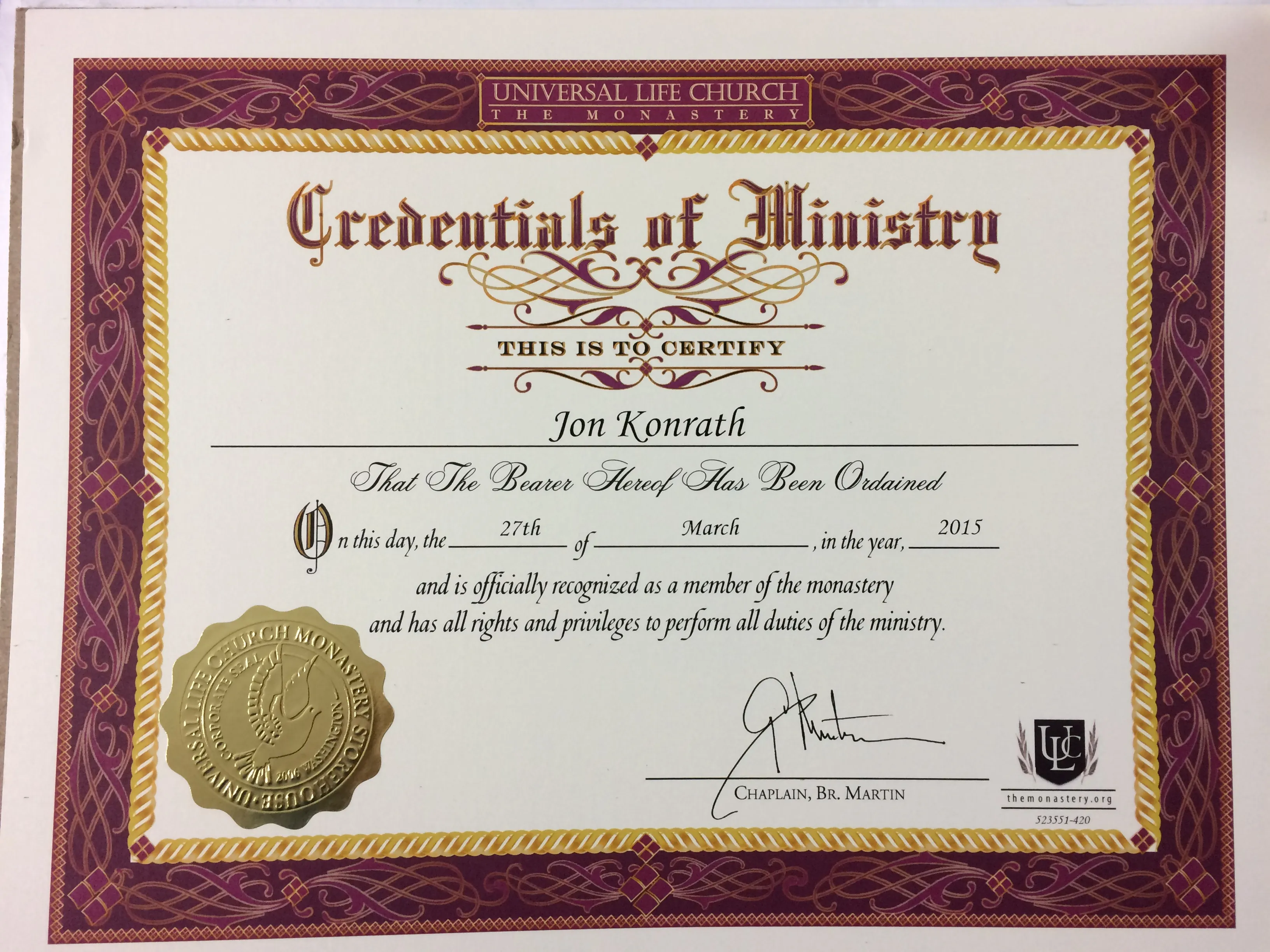
In addition to being a world-famous fiction writer, cough syrup enthusiast, and inventor of the zero-g bong, did you know I, Jon Konrath, am an ordained minister?

Seriously - I am legally ordained. I can perform marriages. I’m available for your wedding. Schedule permitting (I don’t like to leave the house), buy me a plane ticket and put me up somewhere that has free wifi, and I’ll marry you and your sweetheart for a very nominal fee.  (Depending on your state, I might need to get some additional paperwork first, which takes time and money.)

I can also perform funerals, although note that if you ask me to do the eulogy, there’s a strong possibility I will talk about RoboCop for an hour.

Google Photos

Screen-Shot-2015-05-29-at-2.04.54-PM

Anyone else here trying out Google’s new Photos thing?

They announced this new service the other day, a “gmail for photos.” Traditionally, Picasa had a quota, like any other cloud photo storage service, and then you paid for more space. Now, they offer an unlimited amount of storage for free. Also, unlike G+, this isn’t a place for you to simply share photos and make them public; by default, photos (and videos) are made private, and then you choose to share them if you want.

This also isn’t a “social” play like G+, or sharing on Facebook or elsewhere. You can share photos from there, but it’s more like a storage bucket where you put things, and then optionally share them if you want.

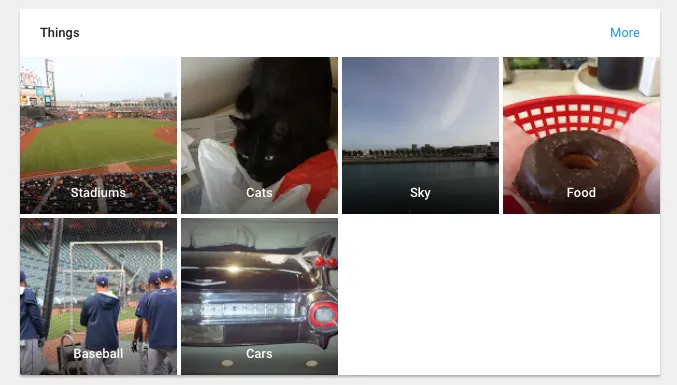
The interesting part to me is that Google is adding various features to automatically categorize or clump together photos. The obvious one is that it will create virtual collections of places, like when you dump all of your geo-tagged photos into one clump. But the other neat thing is that it guesses at other categorization. For example, I had categories magically show up for food, cats, baseball, stadiums, and sky. Your photos are still maintained in a chronological order, just a “firehose” dumping ground, like throwing everything into a folder, but it does this smart collection thing on its own. You can also sort and create collections, and share those, but I’m mostly interested in what it can do without my interaction.

It’s not entirely clear if the original resolution photo is being kept, or if it is hosted. There’s some vague language saying that under 16MP files are kept in the original form. I think it’s serving up compressed versions of them, but you can get at the original (under-16MP) ones if you need them.

I haven’t thought out fully how this would land within my workflow. I keep everything on my computer in Lightroom, which is backed up wholesale to CrashPlan and locally, and then sort through and make collections that are then shared to Flickr. In my head, here are some brief comparisons I could think of:

  • Vs. iCloud: I am not paying Apple to store a copy of my photo library and then killing my battery to constantly sync with it, sorry. It’s why I ditched Aperture.
  • Vs. Dropbox: Dropbox has a quota, and its sharing stuff is a bit clunky.
  • Vs. Amazon Prime photos: Amazon has an unlimited quota, and keeps originals, but their sorting/sharing/organizing is barely there.
  • Vs. Flickr: I don’t like to dump everything to Flickr, because I use it as a destination for albums of sorted, edited, and cropped photos, not everything I take. Plus it’s my “public” destination, so I’m not sending private photos there.
  • Vs. Instagram: I only see that as a one-shot thing for sharing a single, square-cropped photo, not entire albums.
  • Vs. hosting it myself on this site: ugh.

I haven’t messed with the mobile app yet, but this seems like it could be a good solution for the person who only takes pictures on their phone or tablet, and don’t want to sync with a PC at all.  They have a Mac (and I assume Windows) uploader program that you can set loose on one or more directories, an iPhoto library, or any inserted cards/phones to upload the images.

My current game plan is to keep my workflow as before: import my cards/cameras to a Lightroom master catalog, and import from my iPhone and iPad when physically plugged in. Then I’ll create collections, edit, and share to Flickr. But I’ll also upload to Google Photos in the background from my laptop, mirroring my LightRoom masters directory. When I need to one-off mail a picture, I can do that. I also mostly want a way to look at my entire collection when I’m not at my computer, without keeping 30,000 photos on my phone.

One thing suspiciously missing (and this may be on purpose) is that there’s no way to embed a photo from Google Photos into a page here or elsewhere. That would be awesome, to drop a google link in an image tag on this blog, and have Google host it up instead of me. But I could see why they would leave that out on purpose.

Anyway, photos.google.com. Try it out, let me know if it works for you.

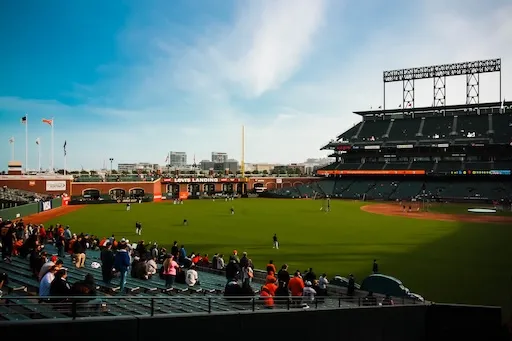
Padres @ Giants, 5/5/15

padres-giants

I got tickets to see San Diego play San Francisco last week, via my wife’s work. It was a last-second, unplanned thing, but my first game of the year, so I went to eat, take a few pictures, and eat.

Here’s a quick bulleted list update of the game:

  • I took BART from West Oakland to SF, which itself was pretty fast, but I always underestimate the walk from the subway to the stadium, which took about 30 minutes.
  • I brought my full-sized DSLR, with the usual kit lens and zoom, plus a new 10-18mm wide. I also brought my EOS-M mirrorless with a 50mm prime.
  • I shot a touch of video with the EOS-M. The wide-angle lens didn’t work out. I feel like I keep taking the same pictures of AT&T park over and over again with the zoom. The 50mm and the mirrorless was great.
  • We had a box suite, but went downstairs to the club level to eat. I ended up getting a trio of sliders that were corned beef and briscuit, and a bratwurst. The corned beef was exceptionally good. The bratwurst was a bratwurst.
  • I’m still (allegedly) a Rockies fan, so I don’t like the Giants or the Padres. I won’t say anything bad, except that I think it’s chickenshit when a World Series champion’s fans boo every player’s at-bat, especially when you’re outspending all but three teams in the game.
  • I actually like the Padres’ dark uniforms. I think they remind me of the Brewers’ uniforms, minus the cool caps.
  • The game itself was eh. The Giants jumped ahead fast, and the Padres never scored.
  • It was Cinco De Mayo, and some dude proposed on the kiss-cam.
  • I saw a huge dude with a giant Bud Lite logo tattooed on his hand.
  • The Rockies game that I was going to passively follow was rained out.
  • We left after the 7th inning.

A bit boring, but I do like going to AT&T for the food.

Pictures are up on flickr: https://www.flickr.com/photos/jkonrath/sets/72157652540439541

Latest Obsession: Guitar

So a week ago, I decided to make a change, hobby-wise, and do something I’ve wanted to do for a long time: learn to play guitar.

I’ve been playing bass for about two and a half years now, after a recess of a few decades. And bass has been fun, but I’d hit a plateau, and thought I’d try something new. I’ve never really played guitar, although my stepdad had an ancient acoustic when I was a kid, and I learned like maybe two riffs, and used to mess with it a little. And I’d tried to resuscitate a few unplayable garage sale guitars when I was a teen, with no real success. (I remember getting a department store Les Paul clone with a snapped neck and trying to fashion a makeshift one from a piece of dimensional lumber, which didn’t work at all.)

So, I ordered a cheap guitar from Amazon. I got the lowest-end Squier Affinity Stratocaster, in the “beginner” pack, which included a tiny shoebox-sized amp I’ll never use, plus other paraphernalia like a bag, a tuner, some picks, and a strap. I also started scouring the web for any lessons or videos that would be helpful. I also have a copy of Rocksmith, which I used for bass, but which works for guitar, too.

The guitar: well, it was DOA out of the box. The jack screws were loose, hand-tight.  I took it apart, futzed with it, and it’s fine now. It looks very nice: a transparent blue, with a white pick guard. It’s a Strat, same size and design, with the three single-coil pickups, and same curves and lines as the more expensive cousin. The neck isn’t too bad, with a couple of sharp frets, but it was playable out of the box with no adjustment. It’s amazing to me that in the day of CNC machines and overseas factories, a hundred-dollar guitar is much more playable than what I’d find in a pawn shop for $100 back in high school or college.

Physically, it’s taking some time to get used to it. It’s much lighter and shorter than a bass, which is nice. The strings are much thinner, and closer together, which makes it feel much different to me. And playing chords is an alien process, as is using a pick. After a week, I am starting to be able to play some chords without my fat fingers dragging across other strings, but it’s going to take much more practice to move around and get used to it.

I’m having a lot of fun with it, though. There’s a complete different psychology to guitar, and it’s the reason I wanted to try it. I like and appreciate the bass, but it’s a different mindset, and I wanted to shift gears. I am not at the point where I can sit down and play complicated things yet, but it’s easy to turn on the distortion and Iommi away on some power chords.

Anyway, here’s the short list of what I’ve found useful for learning guitar:

  • http://www.justinguitar.com - a great source of free lessons for beginners.
  • http://get.yousician.com - a fun game with a guided learning path and lessons. I’m just trying the free option, which is time-limited per day.
  • I got the Dummies book, but I’d only say it is half-useful. I don’t like the dead humor tone in it, and I think they burn a hundred pages on useless stuff before they really get going. Plus I don’t want to learn to play “On Top of Old Smokey” - I’m not seven.
  • This book is only four bucks in paperback, and is short (50 pages) but has good info. For that price, the back cover’s chord chart is worth it.