The Wrath of Kon

Dispatches, thoughts, and miscellanea from writer Jon Konrath

Tag: music

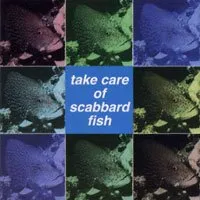
Take Care of Scabbard Fish
a86a6e772a6b4a5485f9f79bcc8cd2c4

This entry is a bit of a placeholder, in hopes that somebody will find it in a google search and maybe chip in more information. It’s very odd that searching on “Take Care of Scabbard Fish” brings up almost no results. Even more weird that it doesn’t come up on sites like discogs or allmusic.

Take Care of Scabbard Fish is a 1994 compilation released by Japanese record label Scabbard Fish (I think?)  Its claim to fame is that it contains the first track released by the band Boris.

Track listing (song title/band/time):

  • Children Of The Revolution - REAL BIRTHDAY 3
  • Access - Speeeedway Baby 5
  • 50 Times - Puka Puka Brians 8
  • Mother Drive Sky - Romeo 5
  • Golden Finger - 50’s Junk 5
  • Papillon - Jam-Jack 6
  • Spacetime - Hula 7
  • I Can’t Stop Laughing - Long Fish,But,Blue 2
  • Eventualy - 20.000 Dope Disk-Junkie 3
  • Maria - Love Sick Lovers 3
  • Water Porch - Boris 5
  • I Never need - Ja-Dow 9

A general description would be that this stuff is Japanese noise/rock from the mid-90s. Lots of feedback, lots of jangly guitar, some stuff bordering on surf rock. But not a lot of it is noise-noise, like beatless, screeching, experimental noise; a lot of it has a heavy groove to it, like basement alt-rock without commercial goals. It’s good stuff.

I haven’t googled through all the band names or songs, although a lot of these seem like dead ends. (How many bands named Romeo are out there?) I don’t have a physical copy of the album, but accidentally found the MP3s on a deep-dive for something else. (Of course, I immediately deleted them and called the police, because piracy is wrong.)

Anyone else have any info on this?

KONCAST Episode 10: Ryan Werner

http://koncast.libsyn.com/episode-10-ryan-werner

In this episode, I talk to writer, publisher, musician, and lunch lady Ryan Werner. He is the author of Shake Away These Constant Days, Murmuration, If There’s Any Truth In a Northbound Train, and Soft. He plays guitar in Young Indian and numerous other bands. He also runs Passenger Side books.

Links from this episode:

http://www.ryanwernerwritesstuff.com

https://ryanwerner.bandcamp.com

http://koncast.libsyn.com/episode-10-ryan-werner

Dü You Remember?

Quick link to a podcast about Hüsker Dü, called Dü You Remember:

https://www.thecurrent.org/collection/husker-du/

(It’s also on iTunes, etc. I just searched for it in the Podcast app, but I’m still on iOS 10, before Apple completely fucked it, so your mileage may vary.)

This was a great five-part audio documentary on the band, from Minneapolis public radio’s The Current. It’s mostly interviews with the band and others (both Rollins and Biafra drop in) and covers the rise and fall of the Hüskers.

I was very late on the scene with these guys, being stuck in heavy metal land and all. I heard a few songs on those SST compilations, which I didn’t discover until right around the time they broke up. By the time I got to college and was surrounded by “college rock,” and later “alternative,” the conversation was more about “have you heard Sugar?” and I had to go backward and hunt down all the old albums.

The whole podcast was apparently conceived before Grant Hart’s passing this year, so there’s a lot of footage of him. Definitely worth checking out.

KONCAST Episode 6: Ray Miller

Click here to for more details on this new episode of The Koncast

In this episode, I talk to Ray Miller, creator of Metal Curse zine, the record label Cursed Productions, and bassist and vocalist of the band Adversary.

We discuss: How we first met 32 years ago, going from Metallica to Death Metal, finding new music in the analog days, how Ray started Metal Curse zine in 1990, Richard C and Wild Rags, John Woods and Rock out Censorship, the 1993 Milwaukee Metalfest, seeing Ice T’s dick, falling asleep while driving on the toll road, how Ray started the Cursed Productions record label, Ed Finkler and Open Sourcing Mental Illness, and making music in the computer age. Links from this episode:

- Metal Curse zine: http://www.metalcurse.com

- Cursed Productions: http://www.cursedproductions.com

- Paragraph Line: http://www.paragraphline.com

- Jon Konrath: http://www.rumored.com

- Xenocide zine: https://www.rumored.com/xenocide/

- Rock Out Censorship: http://www.theroc.org

- Dave Marsh on John Woods: https://web.archive.org/web/20110614224956/http://www.starpolish.com/features/print.asp?ID=440

- Ed Finkler: https://osmihelp.org

(Minor correction: the first Poison album wasn’t on Combat Records. The LP was on Enigma, who released bands like Death Angel, Slayer, Voivod, and so on, but the tape was released on Capitol. So, Mandala Effect, brown acid, not sure what happened here.) Click here to for more details on this new episode of The Koncast

The iCloud Music Library Different Version of a Song Thing

I’ve been having some odd problems with iCloud Music LIbrary and Apple Music. Here’s a description and walkthrough of the issue, partly so I won’t forget it in six months when something completely different doesn’t go sideways, and partly so there’s a record of it somewhere on google, because googling on stuff like “iTunes different version of song” only results in insane hyperbole having nothing to do with the issue.

(Also, take all of this with a grain of salt. This is my experience, and what I tested. Maybe I have the terms or usage screwed up. If so, please comment. Also a big warning: there are a bunch of edge cases that you can hit by screwing around with your settings, potentially destroying your entire music library. This isn’t a list of those. PLEASE do more reading and back up all your shit before you do anything.)

First - I subscribed to Apple Music. It’s like Apple’s version of Spotify; ten bucks a month, and you can stream a bunch of music without buying it, ad-free. It’s not the entire iTunes store’s contents; I don’t know if it’s a subset, or a different list, but it’s fairly comprehensive. There are also various curated playlists, which are neat, and I’ve found a lot of great new experimental music there. It’s all confusingly integrated into iTunes, and I have some complaints there (as does everyone else).

So at home, on the Mac, I’ve got 17,000-odd songs that I’ve either ripped from CD, bought from iTunes, or otherwise downloaded (cough). When I’m at home, I listen to those fine, and also have added some Apple Music playlists to “My Music” as it’s called in iTunes. I listen to the mix of those two when I have internet access, or just the ones on my physical machine when I don’t.

Second - the iPhone Situation. Back in the day, I kept no music on it at all, and carried around an 80GB iPod with a mirror of my collection on it. When the 64GB iPhone came out about five years ago, I started mirroring my entire collection to my phone. When that stopped fitting, I created a bunch of playlists and only synced those, to only sync stuff that was higher rated, recently played, recently added, etc. I also used to sync everything I purchased, but that got to be too much after a certain point. Right now, I sync about 2000 songs, 20GB of stuff. The partial collection sync works okay, although every once in a while, I’d get stuck without something I wanted to hear, but I’d live.

Now, about iCloud Music Library. The text next to this option is “Store your Apple Music songs and playlists in iCloud so you can access them from all of your devices.” The general idea is that you are pushing a master list of all tracks and playlists to the cloud. Then when you use the Music app on another device with that iCloud account login, you get a copy of those lists, and can then stream the songs from the cloud without having them on the device. In theory, I could sync no music to my phone, have zero bytes of music stored or synced, and just get everything from the sky.

There are really two things going on here, and it’s a very subtle difference that is not clearly explained. First case, let’s say I don’t have an album on my Mac. I never bought or ripped the Krokus album Headhunter. (Of course, this is a lie. I think I own 17 copies of this album.) But I found it in Apple Music, I liked it (who doesn’t) and I added it to My Music. What I’ve done is added a link to the album in Apple Music within the big list of songs and playlists in my library. I didn’t download it, though. But if iCloud Music Library is turned on in my Mac iTunes and on my iPhone, that link is added to my iCloud Music Library, and it’s synced to my phone. I can then stream the song “Eat the Rich” from my phone, and all is well (until I drive into a tunnel, or like 80% of Indiana.)

Second case: what also happens is that I am syncing the master list of all of my tracks and playlists to the cloud. So let’s say I ripped that copy of Headhunter from a CD back in 2002, and it’s been knocking around various music libraries on my computers since then. (Probably true.) And maybe I one-starred the song “White Din” because it’s a 90-second intro track of sound effects, and it’s stupid when it comes up when I’m driving around with my windows open stuck in traffic. So the file never gets synced to my iPhone, but it’s in my master list in iCloud. The song “Screaming In the Night” is synced and is physically on my iPhone, so that plays fine, even when I’m in a plane at 40,000 feet and don’t pay extortion prices for WiFi. But if I’m listening to the entire album (which is itself a list of the tracks, stored in this synced master list my phone got from iCloud) and it hits “White Din” it will stream that song for me.

(To also slightly complicate things: if you don’t have the physical song on your device, there is a way to download the Apple Music copy and have a cached version of a song you didn’t even buy on your phone, so you can play it without internet access. This is nifty, but it never ever works, because you will always forget to download that version, and the feature is half-buried and impossible to find or use, and you have to do it on a per-playlist basis.)

The second case is a nice-to-have. The first case, you have to turn the iCloud Music Library to see your Apple Music playlists. It appears to me that there’s some difference between Apple Music playlists and an iTunes playlist I’ve created by hand, because you can’t sync Apple Music playlists unless iCloud Music Library is turned on. I’d been adding all these neat playlists to my library, but couldn’t see them on my phone. So, I turned on iCloud Music Library, and that’s when my problems started.

(Yes, I’m a thousand words into this post, and just now getting to the problem.)

I noticed my playlists were getting weird. Like with this theoretical Krokus situation: I’d be syncing the entire album to my phone, from my own non-Apple Music playlist. Then I’d be out and about, and when the song “Headhunter” came up, instead of playing the studio version that’d I’d ripped from the 1983 album back in 2002, it would instead stream some shitty live version with only one original member recorded at a county fair in 2012.  Or it would stream a horrific EDM dance remix by a DJ from Ireland who also happens to use the name Krokus and has a 38-minute trance number he also called “Headhunter.”

(This is a theoretical example; I don’t know if Krokus was having an issue. Here’s one that really happened though: I had the entire Queensryche album Empire synced to my phone, in a playlist of songs rated above a 3. The album was originally ripped by me from a CD. When the last song “Anybody Listening?” played on my phone, instead of using the synced studio version, it would instead stream a live version of the same song.)

My first attempt at trying to fix this: I renamed the track on my Mac, adding an “(r)” to the filename, thinking that would break the match. It did not. I don’t know why, but it still played the same fucking live song.

My second attempt: I turned off iCloud Music Library. I then told it to delete everything from the phone (which is fine, it’s all copies there) and re-sync. It went back to the way it was. I can’t play Apple Music playlists anymore, but all of my music is fine.

I don’t know why this happens, and I don’t fully understand it, but I’ve got a trip later this week with limited internet, so I’m not screwing with it any more.