The Wrath of Kon

Dispatches, thoughts, and miscellanea from writer Jon Konrath

Tag: apple

Ode to a 2014 Retina MacBook Pro
FullSizeRender-4

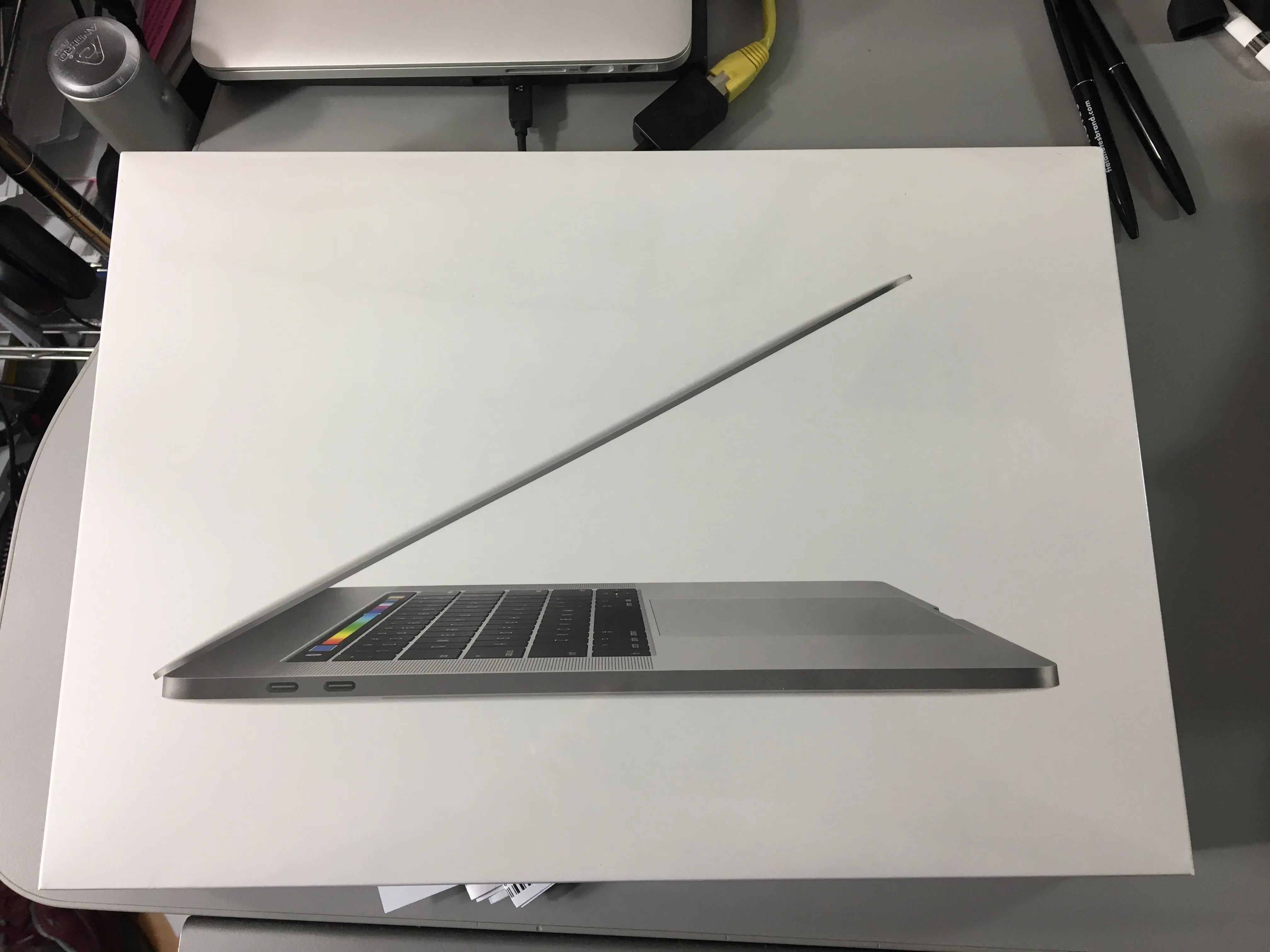
Well, it was time. The Retina MacBook Pro I bought in 2014 reached its retirement, and I got a new one. This one did not have a spectacular death or great failure, but it was getting up there, so I decided to swap it out now, while I could afford it.

Two computers ago, the mid-2010 model I had lasted four and a half years, but had some major problems along the way. It was from the first batch of the dual-GPU machines, and had the NVIDIA curse, which meant two mainboard replacements (within warranty.) There were also two battery replacements, one in warranty, and a later one on my own. A fan crapped out at one point, and I lost one of the rubber feet, and molded a functional but ugly replacement from Sugru. To be fair, I thrashed the hell out of that machine, put some serious miles on it. I still have it, and it still runs, but it’s at the point where the OS doesn’t get updates anymore, and there’s no good browser for it.

The 2014 was a step down in some ways: it was a 13-inch, as opposed to the 15-inch one. It had an i5 as opposed to an i7, and integrated graphics only. But, it was light as hell, very easy for travel. The retina screen was great. And I had no maintenance issues, no repairs, no service, nothing. My only complaints were that the battery is slowly going, maybe 85% of engineered capacity, but losing maybe a percent a week. Its half-terabyte drive was getting pretty crammed. And I was scared to update to High Sierra and break everything, so it stayed at El Capitan. So, no real complaints, but time to move forward.

The bad timing here: my work computer went sideways about a week ago, requiring two trips to Palo Alto to get it wiped, and re-wiped, and re-re-wiped. It got hung up on a Windows 10 update bug, where it would download six gigs of data, spend half a day updating, fail, restore itself, then immediately start the process again. I ended up getting a newer machine, which also had to be wiped/updated, but the whole thing was a giant reminder that I do not like dealing with Windows 10 machines, not that I have any option to migrate all my crap to a machine that doesn’t run any of the programs I use.

I fretted about which machine to get as a replacement. I really wanted a 13-inch machine again, but I really wanted a 1TB drive. By the time you option up a 13-inch machine to get the big drive, it’s almost the same price as the 15-inch. So, that’s what I did. I ended up with a 2017 15-inch, with the 3.1 GHz i7, 16 GB of memory (double what I had), a 1 TB drive (also double), and the Radeon 560 4GB GPU, along with the down-switching to the integrated graphics. Space Gray, which I was 50/50 on, but looks nice.

Probably the biggest pain in the ass is the port issue. The machine now has two Thunderbolt 3/USB-C ports on each side, and a headphone jack on the right (wrong) side. My home setup involves Ethernet, DVI video, and a USB hub with two USB connectors for keyboard/mouse, another for an IR receiver, and then whatever phone or external drive I need to periodically plug in. So, the dongle situation: a TB3 to ethernet; the “AV connector” which has USB/power in/HDMI; an HDMI to DVI; and the existing USB3 hub. I also got a USB-C-to-USB connector for whatever odd thing I need to plug in. And I’m using a USB audio DAC into my monitors. So, two plugs. I thought about a Thunderbolt dock, but they all seem a bit half-baked.

I think the usual screed here is how horrible it is that all ports are going away, Apple is a bunch of fucking evil communists, I can buy a $500 plastic Asus machine at Best Buy that has tons of ports, etc. My general thought is that TB3 is the way to go - much higher throughput, daisy-chainable, and one universal connector. The problem is all the shit that doesn’t use it. But I’ve got that figured out, so, done.

The machine feels a bit heavier, but bigger. We’ll see how it travels, since I am gone next week. Also not sure on battery life, but they tend to get better with each iteration. The keyboard is different. It has Touch ID, which is a little weird, and not that consistent between apps and stuff, but it does work well. Siri is fairly useless on the Mac. I run the machine clamshelled most of the time, so the new touch bar thing is not even on my radar.

I started setting up the machine by hand, copying over files and reinstalling everything, then realized I was going to screw everything up, break my mail or iTunes or whatever. So I gave up, blanked out the machine, and fired up Migration Assistant. I wired the two machines directly with Ethernet, and about two hours later, it finished, and was about 95% set up. Lost a day of writing, but I lost almost two weeks on that Windows 10 machine, so, yeah.

And once again, important PSA: BACK UP YOUR MACHINE. Get an external drive, clone your entire machine on it, and keep doing it regularly. Or use CrashPlan or BackBlaze. Or do both. I didn’t run into any backup issues this time, but seriously, if you have a computer, you need to back it up.

Anyway, happy firestorm or whatever you celebrate.
WordPerfect for Mac

Screen-Shot-2017-11-10-at-5.05.58-PM

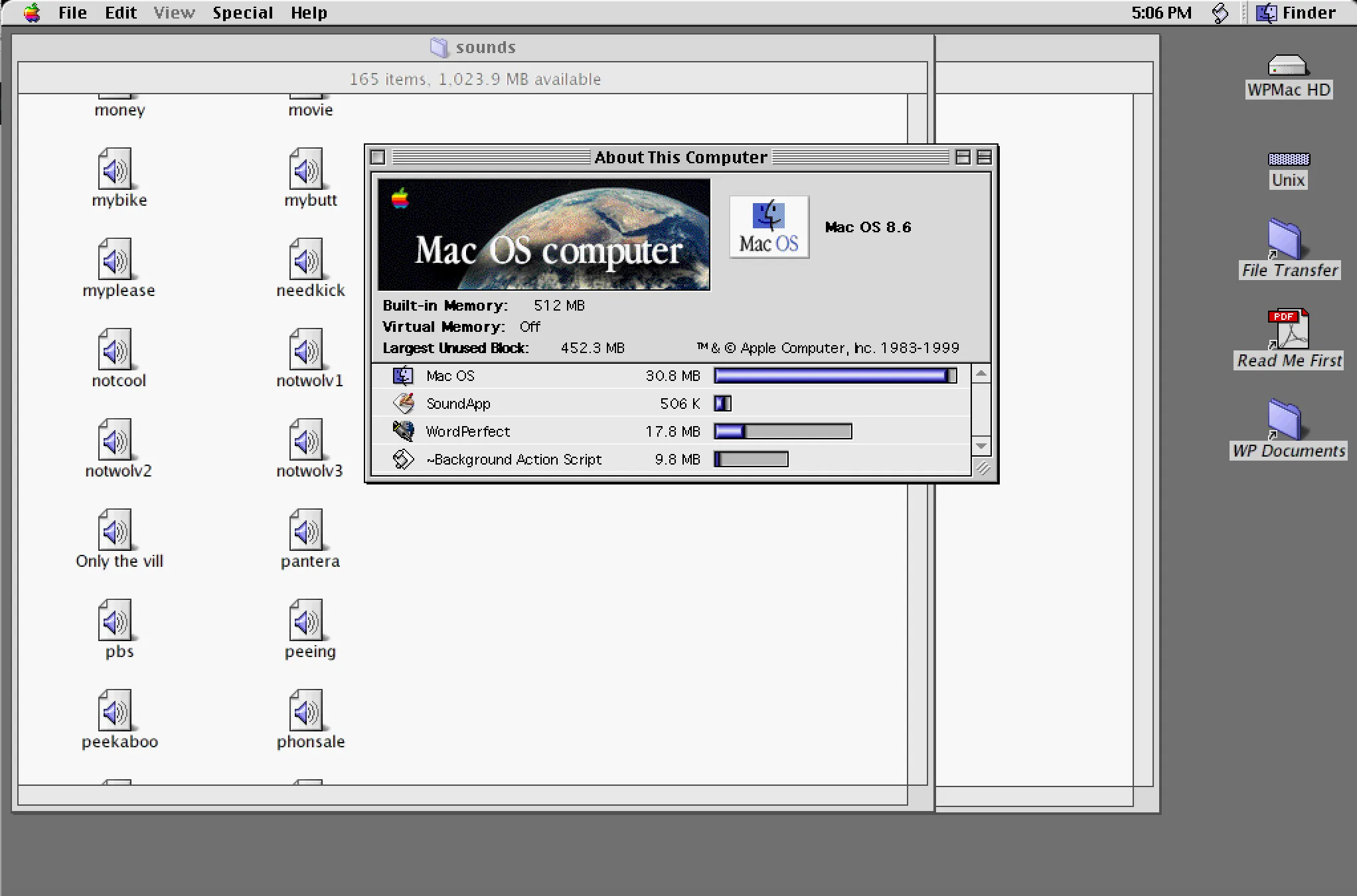
A stupid memory… I was thinking about how I used to love WordPerfect on the Classic Mac OS. It wasn’t a port of DOS WP 5.1; a different dev team wrote their own program, and the company called it WordPerfect, so it worked much faster. I always found it better than Word on the old Sys6/7 Mac.

Anyway, found this page: http://www.columbia.edu/~em36/wpdos/mac-intel.html - Someone has set up the SheepSaver PowerPC emulator to run MacOS 8.6, along with a few versions of WordPerfect. So you can download one image file, and with almost no fuss (aside from the big download) you can then run WordPerfect on a modern Intel Mac.

I was messing with this and realized I have a Stuffit archive of the Mac machine I had at my first job, 22 years ago. I’ve never been able to un-stuff it, because of the weirdness of Mac resource forks or whatever. I brought it into this emulated machine, and it instantly opened it. So I had the same set of files I had back on my Centris 660 AV in Seattle in 1996.

There wasn’t much there: the 1984 commercial in QuickTime; a bunch of QuickHelp source for the Spry Mosaic browser; some other assorted utilities, like DropPS and GraphicConverter. The fun find was I had a Sounds folder, which had a few hundred short clips of audio from Beavis and Butthead and Pulp Fiction. They were all sampled at like 10kHz; the whole folder is like 38 MB.

It reminds me of a time when Windows audio was almost nonexistent, unless you paid hundreds of bucks for a SoundBlaster, but every Mac had pretty decent audio, standard. There was a big culture of hoarding these little ten-second samples of Star Wars and RoboCop movie quotes. Like I remember hanging out with my Calculus teacher at IUSB - this must have been in late 1990. There were almost no Macs at the South Bend campus, but for some reason, he had a brand new SE/30. I went to check it out one time, and he spent half an hour playing me every sound file he had downloaded from the internet, these little clips from science fiction films, all hooked in so it would play Darth Vader when he started up or shut down his machine.

I don’t even know how to play these audio files outside of the emulator, but it works in the program. I guess now I can just go to YouTube and play the entire TV show if I want, but it’s interesting to see a snapshot of how it used to work back then. Also, the old Mac interface looks so blocky and weird now, which is hilarious.

New iPad

Thanks to a generous gift card from Sarah for my birthday, I ended up at the Apple Store, upgrading my iPad again. I was really on the fence about upgrading at all, because there’s a rumor they will be updating in March, but there’s another rumor that there’s a massive 10nm chip shortage that’s going to push back the release significantly. And I’m far enough behind the curve with my circa-2012 iPad 4 that anything would be a big upgrade.

My big dilemma was whether to get the 9.7-inch iPad Pro or the 12.9-inch. I ended up choosing the smaller one, partly because of price, and partly because the 12.9 is a bit ungainly for me, slightly heavy and hard to type on. Also, it really feels like I’d bend it in half at some point, like the first time I put it in a computer bag. So I went with the 9.7, but I did option up to 128GB of storage.

I don’t use an iPad that much to need a Pro version, but this is an oddball side effect of the horrible market segmentation going on at Apple right now. There are essentially four different iPads in three different sizes right now, and none of that makes any sense. What is the difference between an iPad Air 2 and an iPad Pro 9.7? Better processor, better screen, better cameras, the smart connector, the use of the pencil, and better speakers. But why make those two different lines? It’s confusing, and it reminds me of the mid-90s, when there were three dozen different Centris and Quadro and Duo and Fucko models of the Mac, back when Apple really sucked.

As far as the not using part, I really have/had high hopes for the smart connector thing, because bluetooth keyboards are always a pain in the ass, especially charging them. But the $170 keyboard that Apple sells is hot garbage. It feels like typing on an Atari 400, and you have to use it on a table. I want something I can use in my lap, but I don’t know what one that is yet.

I don’t write on the iPad, but I do think about it. For a while a few years ago, I would only take the iPad and a keyboard on trips, and try writing that way. But now, it’s just as easy to bring my MacBook Pro with me, and have access to all my writing at once. I wouldn’t mind using the iPad more for notes, or for a distraction-free writing device.

I also ordered an Apple Pencil online, after deciding not to in the store. Maybe I can use the Paper app to sketch out ideas. A million years ago, I had a Toshiba Windows tablet with a pen, and had huge plans to use OneNote and plot out books and take notes, and I never did shit with it. Maybe this will be the same, but who knows.

Overall, the upgrade, which is about four or five times faster, seems nice and snappy. The new screen is much better looking. And it’s odd that it is physically smaller overall, but has the same screen size. I expect that in a week, I won’t notice the speed jump at all, which is what happened when I upgraded from the gen-one to the four. Still, very nice birthday gift to myself.

The iCloud Music Library Different Version of a Song Thing

I’ve been having some odd problems with iCloud Music LIbrary and Apple Music. Here’s a description and walkthrough of the issue, partly so I won’t forget it in six months when something completely different doesn’t go sideways, and partly so there’s a record of it somewhere on google, because googling on stuff like “iTunes different version of song” only results in insane hyperbole having nothing to do with the issue.

(Also, take all of this with a grain of salt. This is my experience, and what I tested. Maybe I have the terms or usage screwed up. If so, please comment. Also a big warning: there are a bunch of edge cases that you can hit by screwing around with your settings, potentially destroying your entire music library. This isn’t a list of those. PLEASE do more reading and back up all your shit before you do anything.)

First - I subscribed to Apple Music. It’s like Apple’s version of Spotify; ten bucks a month, and you can stream a bunch of music without buying it, ad-free. It’s not the entire iTunes store’s contents; I don’t know if it’s a subset, or a different list, but it’s fairly comprehensive. There are also various curated playlists, which are neat, and I’ve found a lot of great new experimental music there. It’s all confusingly integrated into iTunes, and I have some complaints there (as does everyone else).

So at home, on the Mac, I’ve got 17,000-odd songs that I’ve either ripped from CD, bought from iTunes, or otherwise downloaded (cough). When I’m at home, I listen to those fine, and also have added some Apple Music playlists to “My Music” as it’s called in iTunes. I listen to the mix of those two when I have internet access, or just the ones on my physical machine when I don’t.

Second - the iPhone Situation. Back in the day, I kept no music on it at all, and carried around an 80GB iPod with a mirror of my collection on it. When the 64GB iPhone came out about five years ago, I started mirroring my entire collection to my phone. When that stopped fitting, I created a bunch of playlists and only synced those, to only sync stuff that was higher rated, recently played, recently added, etc. I also used to sync everything I purchased, but that got to be too much after a certain point. Right now, I sync about 2000 songs, 20GB of stuff. The partial collection sync works okay, although every once in a while, I’d get stuck without something I wanted to hear, but I’d live.

Now, about iCloud Music Library. The text next to this option is “Store your Apple Music songs and playlists in iCloud so you can access them from all of your devices.” The general idea is that you are pushing a master list of all tracks and playlists to the cloud. Then when you use the Music app on another device with that iCloud account login, you get a copy of those lists, and can then stream the songs from the cloud without having them on the device. In theory, I could sync no music to my phone, have zero bytes of music stored or synced, and just get everything from the sky.

There are really two things going on here, and it’s a very subtle difference that is not clearly explained. First case, let’s say I don’t have an album on my Mac. I never bought or ripped the Krokus album Headhunter. (Of course, this is a lie. I think I own 17 copies of this album.) But I found it in Apple Music, I liked it (who doesn’t) and I added it to My Music. What I’ve done is added a link to the album in Apple Music within the big list of songs and playlists in my library. I didn’t download it, though. But if iCloud Music Library is turned on in my Mac iTunes and on my iPhone, that link is added to my iCloud Music Library, and it’s synced to my phone. I can then stream the song “Eat the Rich” from my phone, and all is well (until I drive into a tunnel, or like 80% of Indiana.)

Second case: what also happens is that I am syncing the master list of all of my tracks and playlists to the cloud. So let’s say I ripped that copy of Headhunter from a CD back in 2002, and it’s been knocking around various music libraries on my computers since then. (Probably true.) And maybe I one-starred the song “White Din” because it’s a 90-second intro track of sound effects, and it’s stupid when it comes up when I’m driving around with my windows open stuck in traffic. So the file never gets synced to my iPhone, but it’s in my master list in iCloud. The song “Screaming In the Night” is synced and is physically on my iPhone, so that plays fine, even when I’m in a plane at 40,000 feet and don’t pay extortion prices for WiFi. But if I’m listening to the entire album (which is itself a list of the tracks, stored in this synced master list my phone got from iCloud) and it hits “White Din” it will stream that song for me.

(To also slightly complicate things: if you don’t have the physical song on your device, there is a way to download the Apple Music copy and have a cached version of a song you didn’t even buy on your phone, so you can play it without internet access. This is nifty, but it never ever works, because you will always forget to download that version, and the feature is half-buried and impossible to find or use, and you have to do it on a per-playlist basis.)

The second case is a nice-to-have. The first case, you have to turn the iCloud Music Library to see your Apple Music playlists. It appears to me that there’s some difference between Apple Music playlists and an iTunes playlist I’ve created by hand, because you can’t sync Apple Music playlists unless iCloud Music Library is turned on. I’d been adding all these neat playlists to my library, but couldn’t see them on my phone. So, I turned on iCloud Music Library, and that’s when my problems started.

(Yes, I’m a thousand words into this post, and just now getting to the problem.)

I noticed my playlists were getting weird. Like with this theoretical Krokus situation: I’d be syncing the entire album to my phone, from my own non-Apple Music playlist. Then I’d be out and about, and when the song “Headhunter” came up, instead of playing the studio version that’d I’d ripped from the 1983 album back in 2002, it would instead stream some shitty live version with only one original member recorded at a county fair in 2012.  Or it would stream a horrific EDM dance remix by a DJ from Ireland who also happens to use the name Krokus and has a 38-minute trance number he also called “Headhunter.”

(This is a theoretical example; I don’t know if Krokus was having an issue. Here’s one that really happened though: I had the entire Queensryche album Empire synced to my phone, in a playlist of songs rated above a 3. The album was originally ripped by me from a CD. When the last song “Anybody Listening?” played on my phone, instead of using the synced studio version, it would instead stream a live version of the same song.)

My first attempt at trying to fix this: I renamed the track on my Mac, adding an “(r)” to the filename, thinking that would break the match. It did not. I don’t know why, but it still played the same fucking live song.

My second attempt: I turned off iCloud Music Library. I then told it to delete everything from the phone (which is fine, it’s all copies there) and re-sync. It went back to the way it was. I can’t play Apple Music playlists anymore, but all of my music is fine.

I don’t know why this happens, and I don’t fully understand it, but I’ve got a trip later this week with limited internet, so I’m not screwing with it any more.

The Latest S

Another two years have passed. My iPhone wouldn’t hold a charge more than half a day anymore, and I got annoyed at carrying an external battery charger everywhere. So this week, it was off to the Apple Store to trade in the old 5s for the new 6s.

First things first: I do not understand what the hell is going on with upgrading phones. I’m on AT&T, and it used to be you had a contract, you did your two years of time, then you came in and got a $700 phone for $200 or $300 and the promise to re-up for another two years. I realize phones are not “free” and you pay for that $500 subsidy over time. I recently moved to a different plan and gave up my unlimited data plan so I could use tethering, which was probably a mistake, especially since everything is streaming or in the cloud now. But anyway, I was under the assumption this upgrade deal would continue, and the AT&T web site made it look like it would.

But once I got to the store, they said no. I was given three options: pay $750 for an unlocked phone, join AT&T Next and pay an extra $25 a month for the phone and be locked in for 30 months with an option to swap phones at 24 months, or use Apple’s financing to pay some amount (maybe like $25, I don’t know and I’m too lazy to look it up) and then trade up every year. There is allegedly some discount on the AT&T Next thing if you have a newer plan, probably with a lower data amount — I don’t even fucking know. All I know is my cell phone bill went up like 25% for no real reason, but I did end up not paying for the entire phone up front. So they have made it so you pay the same price for not getting the phone subsidy, or you can pay extra to get the subsidy, which is total bullshit. I have a feeling if I would have said “Yeah, I’m not upgrading at all today and keeping my old shit phone” they would have charged me another $25 a month to do that.

Anyway. I jumped from 5s to 6s. The biggest thing about the 6s is the phone itself - it moved from the 4” to the 4.7” size. I looked at the 6s+, and it seemed far too big for a phone. The 6s is honestly too big for me. It’s also very slippery and I’m almost sure I would drop it within the first day if I didn’t get a rubbery case for it. I haven’t dropped an iPhone ever, but I’m certain I won’t make it six months with this one without face-planting it, hopefully not on concrete. The move of the lock button to the right side is also awkward to me, and touching anything at the top of the screen is a chore when holding the phone in one hand. Maybe I should have gone to the larger size and just completely given up on ever using it with one hand. I like the small amount of extra screen real estate, but honestly, there are rumors of a 4” next-gen phone, and I’d almost consider that when the next upgrade cycle happens (and who knows when the hell that is now, with this stupid contract I signed.)

The 6s is faster. It’s much faster, but I’m sure I won’t notice it in a week or so, and it will be the new normal. But the touch ID is remarkably fast. Battery life is about the same. There is the new 3D Touch feature, which detects finger pressure and opens little pop-up windows for frequently-used functions. This feature is largely useless to me, and is the equivalent to when right-clicking was introduced in Windows 95. It meant that some but not all things had a weird right-click menu on it, and you never knew what you could do unless you experimented forever to find these “bonus” menus in odd places, and who has time for this shit.

The camera is a big upgrade, going from 8 to 12 MP on the rear, and 1 to 5 on the front, with better sensors (really the important part, not megapixels) and the video moving to 4K. I haven’t had a chance to do much with the camera yet, but I used my iPhone as camera for most of my vacation pictures over Thanksgiving, so I see myself doing that going forward.

Upgrade was smooth, going from a backup. I had a phone with no music and no stuff on it for the drive home, which was the same as last time. But this time, I also had a watch that was similarly dead (although it could still tell time and everything) because my watch was now paired to an old phone that had been wiped and traded in. The one snag I had moving forward was that Apple Music and the iTunes Cloud crap meant that no music was syncing on the device anymore, and I was streaming everything. I had to fuck around forever with making playlists available offline, and I’m still not sure they are. Apple really needs to figure that shit out.

There’s always been an odd emotional reaction when the old phone gets wiped, shut off, and shoved in an envelope to go off to the recycling plant. My phone never leaves me, has everything on it, and there’s always a close emotional bond to it, as stupid as that sounds. My phones end up going to many states and countries, held to my face for many long phone calls, and tapped away for literally years of online interaction.

This strange nostalgia seems to happen less and less now with each upgrade cycle; I remember it being horrible the first time I traded in my broken iPhone 3G for a new one, after only nine months of use. Now, it’s not as big of a thing. With the cloud stuff and upgrade process, it’s more like a digital soul is being pulled from one host and dumped into another, because the new phone had the same old layout and data and preferences, but in a shiny new case.

Makes me wish I could do that with my own body at some point. Isn’t Kurzweil done with that shit yet?