The Wrath of Kon

Dispatches, thoughts, and miscellanea from writer Jon Konrath

Tag: gadgets

State of the Cameras, 2025 edition
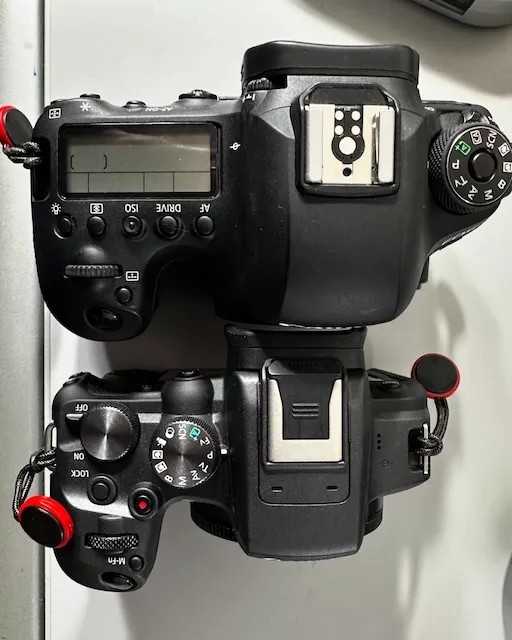
Canon cameras

As expected, before this Norway trip, I had a big freak-out about what cameras to take, which led to too many discretionary purchases. Let me explain.

There were two main cameras before the trip. The big one is the Canon EOS 6D mkii. It’s a great camera and ticks a lot of boxes: full-frame, weather sealed, uses the EF lenses and I’ve got a couple of great L lenses for it, runs forever on a single battery, excellent sensor, built-in GPS and it’s a DSLR so it doesn’t have the usual problems a mirrorless has. More than that, it’s got the usual Canon design language and I like the way it feels, the way the controls are laid out, and the way the Canon works. And as much as I like it, it is not light or small. Glue two pounds of glass to the front end of it, and it’s really not great to haul around all day. And I’ve taken some okay photos with it, but it seems like I was almost doing better with a much lighter crop-sensor camera.

In 2023, I got a Sony Alpha a6400. It’s half the weight of the 6D and much easier to shove in a bag. I’ve taken this camera to India, Singapore, and Spain, and it’s okay, but the ergonomics of it are bugging me. It’s just different, and I can’t explain it. The menu system is complete garbage, but it feels so toy-like and cheap, it’s not enjoyable to use at all. And there’s something off about the color space or the exposure program or something, and I’m constantly blowing shots with it. It’s hard to use in daylight, and isn’t entirely capable at night. And regardless of the time of day, it seriously chews through batteries. I often think that I need better lenses or more practice or more patience with it. And then I go take a hundred shots in an afternoon and look at them and wonder what’s wrong.

And I struggle to say what “kind” of photographer I am. I’m not like a street photographer or a devoted landscape photographer or specialize in portraiture or whatever. I don’t know if I am even a photographer in the artistic sense of the word. I like to capture things, and I like to go back and look through photos to revisit a mood or relive a trip or write about something that happened in the past. I am more of a “document everything” person, and if I get a great shot out of it, cool. But that lack of a specific genre or focus makes me flail when it comes to buying gear, because that’s really the first question someone asks when you are trying to find out what to get, right?

I also have been wandering back and forth on photos versus video, and I have no answers there. Since the 90s, I’ve experimented with different cameras, thinking I needed to shoot video to capture a mood or feeling or vacation or whatever. That started with buying a Hi8 camcorder back in like 1996, which was entirely impractical and largely useless to me. I never took that camera with me, because it weighed so much and I was never comfortable walking around with it and taking random video. I absolutely love the videos I did capture (see https://www.rumored.com/randomlife) but with the impracticality of it, I never used it.

So, two things. First, I decided to get another Canon mirrorless. I was reluctant to do this because i bought an EOS-M1 about ten years ago and bought into their flop of a mirrorless system. They’ve since moved to a new platform, and it’s stabilized and picked up steam, so I thought I’d give it a try. I also thought maybe going back to crop sensor might help. So I bought a Canon EOS R10. It uses a new type of lens, the RF; I didn’t want to buy into that with all my EF lenses, so I bought the adaptor. This also lets me use some of my old EF-S crop lenses from when I had Rebel cameras, so that’s useful. The R10 is amazingly light, uses the same batteries as my old Rebel T6i, and isn’t horribly bad on battery life, especially compared to the Sony. It’s not weatherproof (which was a problem in Norway, walking in the snow all day every day) and there’s no more GPS. (I don’t know why, but I love having a GPS on my cameras.) It also has incredible autofocus and a great sensor. Not only does it have eye tracking autofocus, but it can eye track on animals, which is useful for someone who takes a thousand pictures of their cats a year.

More than anything, the R10 feels like a Canon camera. The Program mode works like I’m used to. It feels the same in my hand. I don’t have to think to know where the knobs are. It’s not as full-featured as the 6D, but it feels the same. It feels the same as both of my Rebels, and even my old EOS 620 film camera.

The other thing, the video thing: I don’t know why, but on a lark, I bought a DJI Osmo Pocket 3. It’s an amazing little gizmo, a gimbal camera in a thing the size of a TV remote, with a screen that flips from portrait to landscape. This was largely a useless purchase, as I’m not going to be full-time vlogging over on TikTok or anything like that. But it does shoot incredible video, and it’s extremely small. I think it’s close to being the perfect “document-everything” camera, and I got a few good shots out of it in Norway.

So, the Sony’s probably going to go. I’m too lazy and impatient to sell it on eBay, and I know I’ll get nothing for it on KEH. But I think the Sony experiment is over. I am not sure if I’m going to start buying RF lenses, although given the current state of things, probably not a good idea to be dropping more money on gear. And the film thing - I’ve still got a few dozen rolls on ice, but I have lost all passion for shooting film these days. I feel like if I’m going to make a bunch of mistakes with exposure, I shouldn’t do it at a dollar a shot. I was completely unhappy with the film I burned in Iceland in 2023, and haven’t gotten back into it since. Fair enough.

And all of this is secondary to what I should be doing: writing. That’s the main priority, so I should get back to it.

videos, writing, programming, pocket computer

DSCF2089

I am sort of done with the Random Life project. There are 100 videos there now. It was fun digging through some old stuff, but I got almost zero reaction from anyone out of it, and maybe it was a dumb idea. Oh well. Maybe in two or three years, I’ll look at it again and it will be interesting.

Been insanely busy with a big work release, and that’s finally done, but I haven’t been back on the horse with anything writing since then. It’s the time of year where I start to panic about not getting a book published this year, since the last year I had nothing published was 2010. But I’m in a weird place right now, where I am having a lot of trouble writing anything cohesive. I am just repeating myself at this point, and I really don’t like what I’ve been doing the last few books. And a lot of people agree, based on my sales numbers. So who knows what I will do. Maybe I will pull something together in the next 96 days. Or maybe I will pick up this writing thing after I retire. I really don’t know.

      • For whatever reason, I started programming again. One of the three projects I always take up when I think I’m going to learn programming is writing a Zork-like game, a text-based RPG. Yes, I could just use Twine or some other game engine to do this. I mean, I could just play Zork. This is mostly just a dumb hobby for me to do because I can’t write, I don’t want to spend two thousand dollars on a gaming PC, and I am not about to start playing golf.

So I started writing this game in straight vanilla C, with nothing but the standard library. I still know a remarkable amount of C, given that I think I learned it thirty years ago. What I didn’t remember is that C is such a pain in the ass to work with. Every data structure that isn’t an integer requires you to either write or steal a library to do it. Dynamic arrays? DIY. Binary trees? You’re on your own. It all involves pointers and malloc’ing memory, and every time I would write ten lines of code, I’d think, “well, that’s going to break in actual use” or “that’s completely insecure.” I got a few hundred lines into the thing before I decided to switch to using Ruby.

I guess Ruby is now an inherently uncool language. All the cool kids use Rust, or JavaScript, or maybe Python. I first started messing with Ruby in the context of Rails development in 2006 or 2007, and spent a couple of years doing a ton of it, on a brief  sabbatical from tech writing. Haven’t done much since then, but I thought maybe I’d do this game in Ruby, no Rails, no ActiveRecord, no crazy gem dependencies. I think it took me about 25 minutes to redo the couple of days of work I did in C.

It was easy to get lost in this, but I also ran into a few issues. The first is the constant though of “nobody uses Ruby anymore.” The other is thinking that some bit of code is a very un-Ruby way to do things. I started reading more about Ruby, and it sort of drove me nuts because the Ruby way to do stuff is usually inherently unreadable. It’s neat and cool, but in my mind, doing a “if this thing is nil, do something else” is more readable than “do something else unless this thing is nil.” I realize I’m probably losing all of you non-programmers here, and I’m being pedantic, but I have some basic fear of writing this thing, publishing it on GitHub, and then having a seasoned veteran look at it like I’d look at a Reddit DIY post about some idiot who proudly enlarged their living room by removing every load-bearing interior wall in their house.

Also I get to the “why are you even doing this?” point. And the fact that I’m relaxing after a dozen of hours of hacking away at unreadable garbage in the Atom editor and pushing it to GitHub by spending a few hours hacking away at unreadable garbage in the Atom editor and pushing it to GitHub. So, yeah. How much does golf cost?


I bought this “Pocket Computer” - a Sharp PC-E500S. It came out in 1995, and has 32KB of memory. It’s roughly half the size of an iPad lengthwise, about 9x4 inches, maybe 3/4-inch thick. It has a 4x40-character display, LCD, and more or less a full QWERTY keyboard, except plastic little keys like a calculator. You can write BASIC programs in it, but it also has a bunch of crazy engineering software in it, so you can do integral calculus or pull up a periodic table of elements. It runs forever on four AAA batteries.

I don’t really know what I’ll do with it. I won it on a lark - made a hail mary offer on it on eBay, and the seller accepted. It has a serial port that uses a connector I’ve never seen, and a cartridge port for proprietary memory cards that are impossible to find. It is slightly more useful and interesting than the Casio FX-7000GA I have from 1990, which currently spends its time in a storage container in my closet. I need to keep in mind that buying things doesn’t really give me the joy I think it will.


The helicopter picture above is apropos of nothing. It’s from my Alaska trip in 2006. I think I’m at the point where I want to go back to Alaska, and I’m currently stuck with a bunch of Alaska Air credits I can’t use, but who knows when it will be safe to get back up there. I sometimes think it would be cool to go further north, head up to Fairbanks, but I don’t know the logistics of it. Maybe at some point.

A Tale of Two Keyboards

kinesis

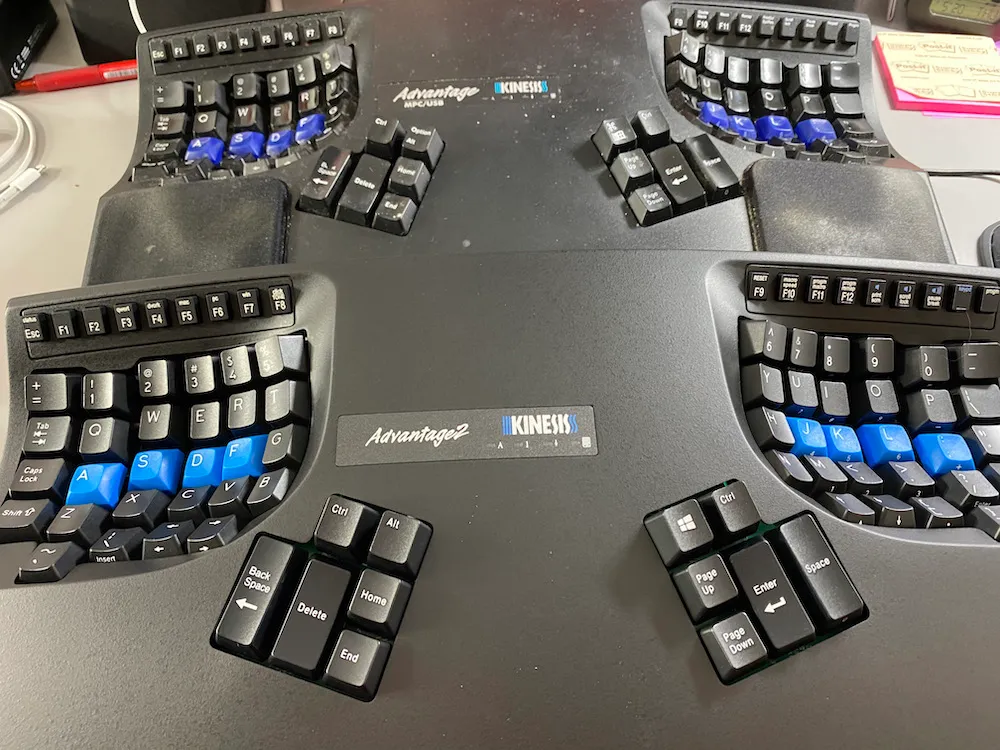
About ten years ago, I had this keyboard obsession going on (see The Cult of Keyboards) mostly because everything started falling apart health-wise when I hit 40, especially all things chiropractic. After a few false starts, I decided to go whole hog and upgrade to a Kinesis split keyboard. Because it’s about time, I went ahead and upgraded to the newest iteration, the Kinesis Advantage 2.

The original Kinesis has been pretty decent, after a brief learning curve. Typing with my fingers in the two “bowls” and using my thumbs for a bunch of the modifier keys was an interesting transition, but it means I can type away without ever lifting my hands from the home row. There are some issues, though. In the top row of the thumb keys, there are only two switches, when there really should be three, for cmd/alt/ctrl (or whatever your OS calls them.) It’s also a bit more confusing, because I used to switch between a work PC running Windows, and my home computer, which is a Mac.

I mapped things so that in Windows, the modifier keys were Ctrl/Alt and Win/Ctrl. And then on the Mac, they were Cmd/Opt and Ctrl/Cmd. That means that on the Mac, Ctrl loses, and since I type modifiers with my left hand more, it makes emacs almost impossible to use. I also had to train myself to remember that when I switched to the Mac, my Ctrl key was really the Win key. Luckily, things like copy and paste would use the same key in both places. Also, when I switched jobs, the work computer switched to Mac, so this problem gets a bit more simple.

Another complaint about the original Advantage is that it had function keys that were those little rubber chicklet keys like the Mattel Aquarius or a bad 80s calculator. They’re also very narrow. And the Esc key is one of those, which really makes emacs bad. When I was heavy into FrameMaker at the job, I remapped the Home key in the left thumb cluster as a modifier so a Home-5 was F8, and a Home-6 was F9. (5 is right under F8, and 6 under F9.) I also mapped the End key to Esc, because FrameMaker had a ton of frequently-used shortcuts that nobody knows about anymore that begin with Esc, a leftover from its days on unix systems. I would map those only on the Windows system with AutoHotKey. I gave up on that a few work laptops ago, when Frame fell by the wayside.

Also, I had minor occasional problems with the USB firmware. It was designed probably right when USB 2.0 came out, and would sometimes freak out and require a reset. Also if you typed too fast with a modifier, the modifier would get stuck. (Hint: tap the shift key three or four times, and it unsticks.) I also had the usual wear and tear, a few keys losing their printing, and ten years of food and cat hair in the crevices.

The new Advantage 2 fixes a few things. First, the function keys are actual Cherry mechanical switches. They are, unfortunately, the same small size. The circuitry has also changed, and is allegedly better than the old controller. It now has two ways to remap keys: the old way, or you can mount the keyboard as a hard drive with a special key combo, and there will be an app to do complicated remappings, or a text file you can edit. You lose the two built-in USB jacks on the underside of the keyboard, but I never used those.

I wasn’t entirely happy with the upgrade. Although the keyboard uses the same key switches (MX Cherry Brown), typing on it feels very… cheap. The keys are not as glossy and seem to be made of a slightly different plastic. And the case feels a lot more hollow. There’s more of an echo-ey plastic feeling when typing. It feels like the unit was “cost-engineered” with cheaper materials or a more efficient mold to save a few pennies. It’s possible I’m imagining all of this, or the keyboard needs to break in or age a bit. But I’ve also seen a few people on the internet that felt the same, and have messed with putting DynaMat inside their keyboard to deaden it a bit. Maybe I should try that.

I also had a giant exercise to get the modifiers to work. You can swap them around at multiple levels: the keyboard has a Mac/Win setting; there’s an OS setting; and I think my KVM might be flipping the mapping, too. Plus you can physically swap the keycaps to get the labels right. I ended up putting the keycaps on as Cmd/Option and Ctrl/Cmd, swapping Cmd and Ctrl in the Mac system preferences, and setting the keyboard to Windows mode. That seems to mostly work. I also mapped the Home key to Ctrl. Maybe I’ll map End to Esc later.

So, we’ll see if I can put a few million more keystrokes through this one. I also need to avoid reading anything else about modifications, because there are people who burn serious time swapping out controllers, doing complex remapping, and changing keycaps and whatnot. I don’t have that much skill or energy, so I’ll stick to typing.

The age of adapters

IMG_4371

Two disparate conversations got intermingled in my head this week. One was a long discussion about the days of AM radio and only AM radio in cars, and the other was a day where multiple people asked about various dongle issues, USB-C vs. USB3 vs. Thunderbolt or Thunderbird or whatever the hell Apple calls USB-C now. Anyway, both of these things make me think of how in general, we’re so adapter-free now, and can generally shoot music and videos and photos straight through the air at each other, at the cloud, at machines like TVs and printers and coffee machines. I promise this isn’t the usual “these damn kids don’t know what it’s like to hunt for the right DB-9 to DB-25 RS232 cable” old man rant, but these two things made me think of the ubiquity of adapters in the seventies and eighties as the landscape of tech rapidly changed.


Example one: car stereos. For decades, the standard was AM radio, and that’s it. In the US, the AOR FM stations started their reign in the late 60s, but it wasn’t until 1978 that there were more FM stations than AM, and a lot of them were simulcast stations of the same programming. I think by the time I was sentient enough to have my own radio and listen to my own music, the top-40 stations in my area were FM, but FM radios were still an upgrade option for most cars back then.

I remember my former stepdad had an old Buick, maybe a 71 or 72, and it had the stock AM radio. But he’d upgraded this for the bold new future of AOR programming by buying a little Radio Shack box, a Realistic FM tuner. It sat below the all-metal skull-crusher dashboard of this giant beast of a car, somehow spliced into the old wiring, so it would pump high-fidelity FM stereo sound into a single three-inch paper speaker. Seems like it would have been easier to rip out the stock radio and slap in a Krako tape deck with an AM/FM tuner, but maybe that cost an extra ten dollars. Also, leaving in the old radio wouldn’t lower the value of the vintage $500 vehicle, I guess.

Another big thing was that in the late sixties/early seventies, nobody could decide on what physical media format was the king of mobile applications. Spoiler alert: the cassette won, and there were suddenly millions of vehicles on the road that couldn’t play them. One “adapter” approach was to go to Radio Shack or K-Mart and pick up an under-dash tape player, much like the external FM tuner, and wire that up so you could play your Barry Manilow cassettes through your stock sound system.

What I always found funny, although I never saw one in person (I did read a lot of Radio Shack and JC Whitney catalogs as a kid, so I knew of them) were the 8-Track to cassette adapters. If you were an early adopter of the bigger and quickly obsoleted tape system, you could buy a plug-in adapter, which looked like a really long 8-Track tape, but the part that stuck out of the dash had a cassette player mounted horizontally in it.

(For a quick look at all of these options, take a gander at this 1976 Radio Shack catalog.)

I never really bought into this adapter madness — I either went to the junk yard and bought a tape deck out of a junked car for twenty bucks, or just brought a jambox and put it in the passenger seat. But that was when I was still spry enough to crawl around under the dashboard of a subcompact. Maybe I’d think differently now that my back is out, who knows.


Much later, the cassette was dethroned from the top of the heap of the physical media world, and then the argument resurfaced on how you get your various iPods and DiscMans and whatever to talk to your tape-only car stereo.

The very first time I bought a portable CD player in 1992, it actually shipped with the solution in the box: a little fake cassette with a cord dangling out of it that plugged in the headphone jack of the CD player. I used a system like this for years, first for that CD player, but later for the MiniDisc and iPod. I didn’t have a car during the heyday of in-car CD players in the early 00s, but I rented cars quite a bit on vacation. And of course, I’d always forget that damn adapter and would have to buy another one for twice as much at an airport. So I have a big collection of those things in storage somewhere.

There was also a much worse adapter for cars that didn’t have tape decks. It was basically a Mr. Microphone but it took the signal from a headphone cable and broadcast it over channel 88.1 with like a milliwatt of power, so you could tune in a car radio and magically listen to your CDs.

I got stuck with one of these when I was Hawaii in 2003. It was basically like this scene in Spinal Tap. I’d be driving around the island, happily listening to an album on MiniDisc, and I’d zip by some volcano park or whatever the hell that would blast out weather advisories at a million megawatts on the same exact channel as the adapter, interrupting my song for the next few minutes. I finally gave up and bought a Skynard CD at a gas station and listened to that for the rest of the trip.


The adapter thing was also big in the beginning of personal computers. Both Atari and Mattel had popular game systems, and then Apple and Commodore came out with home computers. The popular thinking of parents at that time was that kids needed to learn about computers so that by like 1995 when paper was obsolete and the world was run by artificially-intelligent mainframes, the kids would be able to get good jobs to afford flying cars and robot butlers. So why buy a gaming system and later buy a home computer, when you could take your existing gaming system and magically turn it into a home computer with a plug-in box like that FM radio tuner?

Atari had a few different approaches. They came out with a BASIC cartridge, which was laughably bad, given it could only use 64 characters of memory for programs, and you had to type in programs with gamepads. Next they tried to release the Atari Graduate for the 2600/VCS gaming console. It plugged into the cartridge port and had a membrane keyboard that sat on top of the 2600, adding 8K of RAM and the ability to hook up peripherals like a tape deck, a modem, and a printer. This was supposed to be a $79 add-on, but never shipped because (allegedly) of some arguments between Atari management and the third-party team developing it. There was also a third-party thing called the CompuMate that shipped, but didn’t take the world by storm, probably because you can’t do much with a 10x12 character screen.

Mattel was a bit more infamous about this, because they promised a computer add-on and never delivered, which got the FTC to slap a $10,000 a day fine on them, and lit the fire to for them to come out with anything that could legally be called a computer and dumped on a small test market at a loss, which is exactly what happened.

The Entertainment Computer System was an add-on home computer for the Intellivision, which was a small external chicklet keyboard and a box that plugged into the side of the Intellivision, and was probably 75% the size of the actual Intellivision, and had its own power supply. The thing added BASIC, 2K of RAM (but you couldn’t use all 2K for your programs), another sound chip, extra controller ports, and the interface for a cassette recorder. They also came out with an add-on synthesizer keyboard — this was the heyday of Mattel’s Synsonics instruments. The whole thing got the FTC off their backs, but didn’t entirely catch on, and then Mattel imploded a year later.

Coleco also did this with the Adam computer, which was available as a standalone or as an adapter that plugged into the ColecoVision console. I don’t know the architecture of the add-on or how well it worked, because the only things I ever heard about were the Adam’s other major shortcomings, like the gunfire-loud printer; the fact that the power supply was in the printer so when the printer died, the whole system died; and the slow cassette system built into the main unit, and a burst of EMF at start-up would nuke any tape in the drive, even though the instructions told you to put the BASIC tape in the drive when you booted.

The more interesting one was that Coleco came out with an adapter that would enable your ColecoVision to play Atari 2600 games. This wasn’t some kind of sophisticated emulator or anything; it was functionally an entire reverse-engineered Atari 2600 that hooked onto the front of the ColecoVision and used nothing more than the video connection and power from the ColecoVision. The expander has a 6507 CPU, memory, and the whole deal. You had to unplug your Coleco joysticks and plug them into the expander (or I guess buy some Atari sticks, if you wanted the same feel.) Coleco got sued by Atari about this and Atari lost.

Likewise, Mattel also had an Atari compatibility “adapter” that was also a near-complete 2600 that plugged into an Intellivision. And Atari did the same thing themselves with a near-complete Atari 2600 that plugged into the Atari 5200. These were major marketing coups in that they radically increased the other systems’ library size. The downside was they increased their libraries with really bad games. I don’t think people remember how bad Atari 2600 games were, even compared to the 5200 or Intellivision.

The whole thing is bizarre though. It reminds me of in the 1950s, the Air Force built this giant B-36 bomber, and when they decided there was no way to bolt enough guns onto the 200-ton behemoth, they thought, “hey, let’s just hang entire fighter planes on the big plane and have the best of both worlds.” (That never really worked out, BTW.)


Now we’ve solved the upgradeability problem: everything is sealed shut with glue, and when you want a better version with newer features, you throw the old one in a landfill. Sometimes I wonder if this adapter fetish of last century was some holdout to the days when a TV or a radio was a piece of furniture you kept forever and serviced with in-home repairmen, like a furnace or a car. Maybe people thought they would invest in a system and then it would slowly grow and evolve over time.

(Oddly enough, Apple embraced this for a time, and you could upgrade early Apple machines with an upgrade kit that replaced the logic board, but kept the old case. For example an Apple IIe could be upgraded to a IIgs, or a Mac 128 could be upgraded to a Mac Plus. I don’t know who did this, and you were basically replacing the entire machine but keeping the old yellowed case, so why not just pay more and get the whole thing. Maybe schools did it. I could see a school administration making a bone-headed investment like that. I bet I’m still paying off tax bonds from when my local school did this in 1977.)

I think these various false starts caused the adapter appeal to dwindle. The last one I really remember is the Sega 32X, which was a stopgap measure to put two high-speed CPUs, a GPU, and more memory onto the 16-bit Genesis, which allowed it to run… well, virtually no games, because nobody supported it. Anyway, it seems like now the thing is to own one of every console, or just run the things on your phone. People aren’t as up in arms about o “teaching computers” to kids like they did when they thought “computer technician” was a vocational skill like a cabinet maker or TV repair person. Everyone seems to know how to use a computer off the bat, or instinctively know how to move a mouse or swipe a screen. And our homes are filled with computers, whether we know it or not. The webcam sitting on my monitor probably has a CPU orders of magnitude faster than some of the mainframes I used in college. Just let the kid screw with the old iPad, and they’ll figure it out, I guess.


Anyway. Dongles: USB-C is a subset of Thunderbolt 3. They use the same size connector, but TB3 can be twice as fast and use half the power, depending on the device and the cable. That’s all. Enjoy not having to buy another device that costs 90% of your first device to play another manufacturer’s games.

Day 167

I don’t really know how many days into the lockdown we are. I suppose I could figure it out. I also suppose I could update more here, instead of just when something breaks. But there’s not a lot otherwise going on.

So remember last year when my iPhone 8 blew up? Almost exactly a year later, the replacement started swelling again. I wasn’t planning on upgrading for a while because I was fully paid up on the old one, and I figured the year-old replacement would last until Apple came up with a reason for me to get a 12 or a 13 or whatever. Well, there’s my reason. I bought an iPhone 11 Pro, and paid far too much for it. The Apple Store near me is open in a limited fashion now, so I did an in-store pickup, where I showed up at an appointment time, stood out on the sidewalk, and got the phone brought out to me. I bought it straight-up instead of dealing with any of AT&T’s byzantine payment plans. That part was easy enough.

The migration, which is supposed to “just work” did not work. It took me four tries, about a half day. I thought I’d just sync the old phone to my Mac, then plug in the new phone and restore to it. I don’t know why it took so many tries to get this to work. One thing I noticed after my first fail is that the cable I bought a year ago and the cable that came with the phone were different. They are both Thunderbolt (aka USB-C) to Lightning, but there’s some internal difference. The same thing happened with the laptop last May. There’s some subtle difference between USB-C and Thunderbolt, or there’s some difference between data cables versus charging cables versus fast-charging cables versus… whatever. And of course all of the cables are white, and look identical. I found out that some of the newest cables have a very light gray number on them, like instead of the RGB value of #FFFFFF for white, it’s #FEFFFF, and you need a jeweler’s loupe to read it, and then you have to google the value, and it’s on the seventh page of results because the first six are rumors about the next iPhone or something.

The new phone has a larger screen, but is about the same size. It has Face ID, which is fairly useless. First, it can’t identify me with no glasses, or with a mask on. Also, I’m in the habit of grabbing my phone and unlocking it while it’s still in my pocket or on the way up, and that’s impossible now. I also can’t unlock it while it is on the dashboard of my car. Also, I bought the battery case, so the phone is far too heavy and thick. I am almost sure I will drop it in the near future. And the gestures to use it with no home button are annoying.

The new camera is interesting. It has a portrait mode, which simulates a low depth-of-field lens, which is nice. It also has a wider lens, which is good for landscape photos. There is a night mode, which might be useful if I ever leave my house at night again, which won’t be any time soon. Overall, the camera stuff is neat, but for this price, I could have bought a nice DSLR or mirrorless camera.


Another Apple semi-fail is that the Airport Extreme I bought a few years ago was showing its age, or maybe having Sarah work upstairs full-time was requiring better WiFi coverage. I have bad luck with routers and they always seem like a perishable product; after two or three years, they just go rotten, and no firmware update or restore will make them better. Apple doesn’t make routers anymore, so after much research, I ended up with a Ubiquiti Amplifi HD. It works, but I’m not in love with it. First, it took a few tries to get it started. (They insist that you reboot your cable modem during setup, which makes no sense, but it didn’t work until I did, so I guess that’s my fault.) It uses a cutesy phone app for all configuration, and I’d rather have an actual browser-based admin. I also wouldn’t mind better logging or something (I’ll get to that in a second) but it seems to work fine. I have the router downstairs, and the mesh stations in the living room and upstairs, and it has roughly doubled performance up there, so mission accomplished.


On to the next problem. Right after I got the new phone set up, Comcast started complaining that we were close to our data cap of 1.25 Terabytes. They’ve waived the cap for the last few months because of COVID-19, but now that COVID is completely cured and everyone has returned to the office, they’ve started charging people for going over again. Wonderful.

This started the anxious exercise of trying to figure out how we’re using so damn much bandwidth. Of course, plugging in a new phone meant it automatically had to redownload every app and a bunch of big updates, so that’s probably fifty gigs. And as I looked at my machine, I realized my Backblaze cloud backup was then uploading that fifty gigs of updates, so I got double-taxed on it. I installed a copy of Bandwidth+ and Little Snitch to try to figure out where all of my data usage was coming from, and man that is horrible.

First of all, Apple is downloading monster updates constantly. Every little point release of iOS or MacOS is at least five gigs of data, and on my desk, I’ve got three different devices. And like I said, those are all getting backed up. (I stopped doing that, so that’s some savings.) But it’s also amazing how much a Mac will change over the course of a day. I started scheduling my Mac to back up at midnight, and it would send a few gigs of data up. Then I’d wake up, do nothing for nine hours, and Backblaze would say it had a half-gig of updated files ready to back up. I’d look, and it was all crazy iCloud stuff, the Mac recording Siri suggestions even though Siri was deleted, tons of deltas on files in the calendar and email programs that had been doing nothing. I have no idea how to stop any of this, but with two Macs in the house doing this, there’s like ten percent of the 1.25 TB right there.

Another thing with Little Snitch - ok, so this is a program that will fire up an alert every time anything tries to make an internet connection, and then you can set up automated rules to allow or block certain things. It also shows you what programs are using the internet, and tracks their usage. (My router problem: I wish I could do this for every machine in my home, like at the router level. I know if I spent two grand on a pro Cisco router, I could do this. But my little consumer one won’t.) Anyway, it is amazing how much some programs hit the outbound connection. Like if someone in my house even says the word “Adobe” I get a dozen outbound connection requests. Creative Suite is basically a piece of malware that happens to have an image editing program in it.

Facebook is also particularly bad. Even though I think I’ve disabled whatever video auto-play is in FB, it will hit this one video CDN continually, preloading things it isn’t showing me, to a tune of a gig per every few minutes. I know, quit Facebook. But it’s amazing how blocking that CDN saved me a ton of grief. Even better, I spotted the CDN that auto-loads those annoying videos that pop up any time you go to any news web site. Life is much better after I blocked that thing.

Oh, about the data cap. After much research, I found there are a few options to remove the cap. One is to straight-up pay them $30 a month. The other is to lock into their new xFi router ecosystem, and rent a new modem, and they will remove the cap for $25 a month. I currently rent an older modem of theirs for $14 a month, so they sent me a new router, which I will immediately put into bridge mode and ignore all of their new features, which probably don’t work. I hate to pay that $11 a month, especially with how high the bill is already, but $11 versus obsessing over this every time I launch my browser is worth it.


Not much else is up. I’ve spent a lot of time walking at NAS Alameda and have a ton of photos I should probably organize someday. Other than that, it’s been work, work, work. I have another “vacation” coming up, so maybe I can do something productive that week.